
News
Nothing Rolls Out Major Essential Space Update for Nothing & CMF Phones

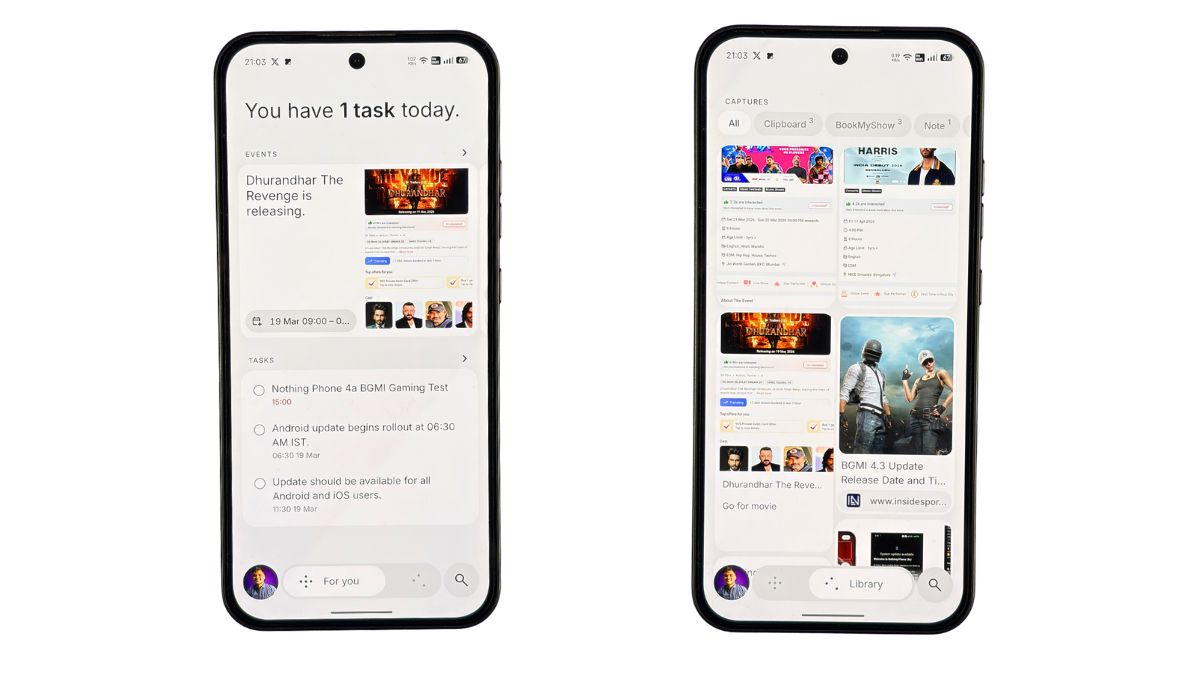
Nothing has started rolling out a major update for the Essential Space app on its smartphones. This update is available for all Nothing and CMF devices that support the Essential Key.
The update is small in size (around 584 KB), but it brings several useful improvements, including a new user interface, better organization, and smart features.

New UI with For You & Library Pages
One of the biggest changes is the redesigned UI. The app now includes two main sections — For You and Library.
The “For You” page shows your tasks, events, and important information in a clean and organized way. Meanwhile, the “Library” section stores all your captures like screenshots, recordings, and notes.
New Events Feature
Nothing has also introduced a new Events feature. The app can now automatically extract event details from your screenshots and captures. For example, if you take a screenshot of a movie ticket or event date, Essential Space can detect it and show it as an event. You can also quickly add it to your calendar or open the location in Maps.
Semantic Search Support
Another useful addition is semantic search. This allows users to search their saved content more easily. Even if you type a related keyword, the app can find relevant captures, tasks, or notes.
Performance Improvements
Along with new features, the update also includes bug fixes and stability improvements, making the app smoother and more reliable.
Overall, this update makes Essential Space more useful in daily life by improving organization, adding smart event detection, and making search more powerful.
Stay updated with latest tech news
Follow TechiBoy on Google to get updates on smartphones, gadgets, software updates, and more.





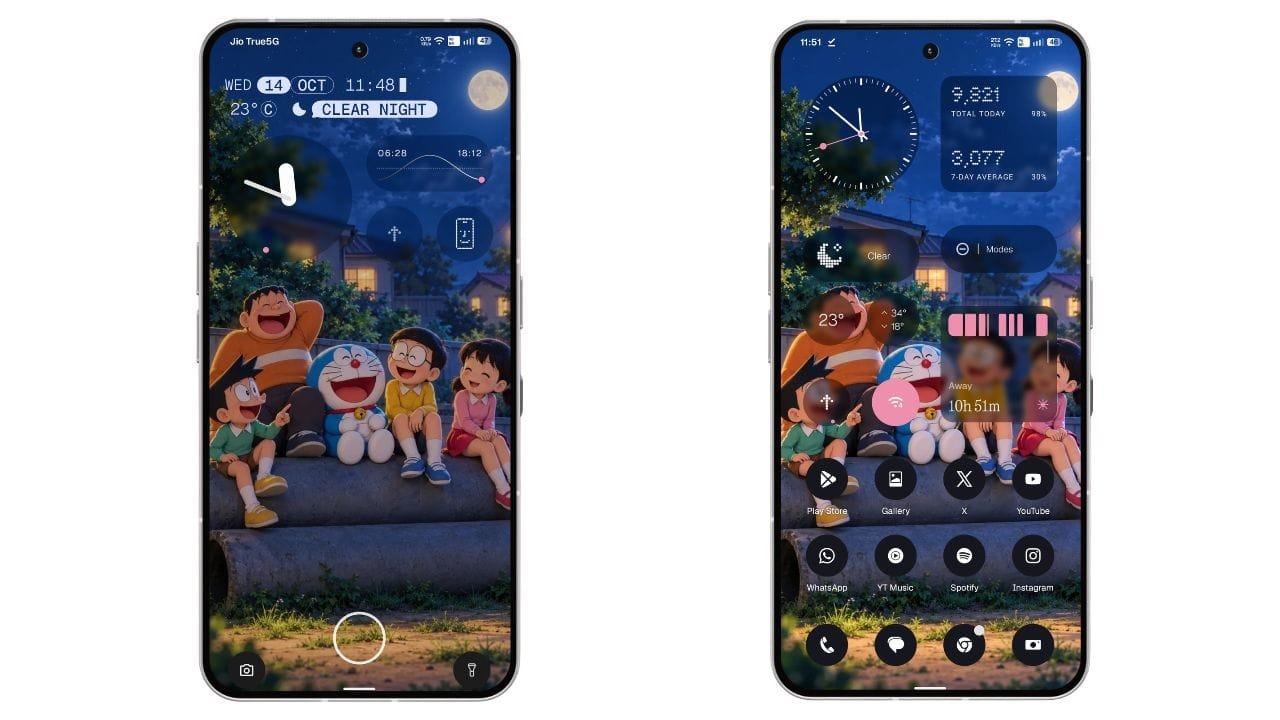
Nothing has started rolling out the stable Nothing OS 5.0 update for the Nothing Phone (3). The new update is based on Android 17 and brings a refreshed user interface, new customisation options, improved widgets, camera enhancements, and several system improvements.
The stable update is now rolling out to Phone (3) users who participated in the Open Beta programme. For beta users, the update size is 1.68 GB. The rollout is happening in phases, so it may take some time to reach every device.
Nothing OS 5.0 Update Details
- Device: Nothing Phone (3)
- Software version: Nothing OS 5.0
- Android version: Android 17
- Update size: 1.68 GB for beta users
- Update type: Stable update
New Translucent Theme Brings a Fresh Look
One of the biggest highlights of Nothing OS 5.0 is the new Translucent Theme. It brings a frosted-glass look to the Launcher, giving the interface a fresh and modern appearance.
The theme also uses subtle accent colours inspired by the current wallpaper. Users can enable it by going to Settings > Customisation > Theme & Style > Translucent.

Nothing has also refined the status bar icons, updated the Settings interface, and introduced the new Geist typeface. These changes make the overall interface look more consistent.
Two New Lock Screen Clock Styles
Nothing OS 5.0 brings two new clock faces to the lock screen: Gooey and Micrographics. While Gooey was already available in the Open Beta, the stable update introduces Micrographics as another option for users.

Gooey offers a bold and playful look with fluid shapes, giving the lock screen a unique appearance.
Micrographics takes inspiration from the graphic design of Nothing’s hardware. It brings the date, time, weather, and upcoming meetings together in one glanceable view, making it easier to check important information directly from the lock screen.

Users can also customise the clock colour to match their preferred style. Along with these new clock faces, Nothing OS 5.0 updates the wallpaper gallery and improves the overall customisation experience.
New Glyph App and Separate Quick Settings
The update introduces a dedicated Glyph app that makes it easier to access and manage Glyph Interface settings.
Another major change is the option to separate Quick Settings and Notifications into different panels. Users can enable this option through the system settings.
Nothing OS 5.0 also allows users to arrange multiple home screen app icons in bulk, making it easier to organise the home screen without moving every icon individually. A new three-colour status bar indicator also helps users identify sensitive access, location, and AI processing activity.
New Widgets and Camera Improvements
Nothing OS 5.0 brings several new widgets, including Collector widgets that let users decorate their home screens with photos. The Away Time widget helps users track time spent away from their phones, while Glyph Timer adds another useful option to the widget drawer.
The Camera app also receives multiple improvements. Users get a new Tuning feature with seven adjustable effects, improved Presets editing, and a new 2×2 Presets widget.
Video recording has also been enhanced with Filters and Tuning support, Dual-view Video, and H.265 encoding. Nothing has also improved several camera functions, including zoom, close-up shooting, QR scanning, Google Lens, and Motion Photo playback.
Other Improvements in Nothing OS 5.0
Apart from the visual changes, the update includes several useful system improvements:
- Expanded Dark Theme support for more apps.
- Adjustable HDR brightness intensity.
- Faster Essential Voice transcription.
- Improved lock screen shortcut interactions.
- One-tap Bluetooth connection and disconnection from Quick Settings.
- Improved Live Updates.
- Noto 3D Emoji support in Gboard.
- Better transition animations and interface refinements.
These additions aim to improve the everyday experience of using the Nothing Phone (3).
How to Download Nothing OS 5.0 Stable Update
Nothing Phone (3) users can manually check for the update by following these steps:
- Open Settings on your phone.
- Go to System.
- Tap System Update.
- Check for the latest update and download it if available.
- Install the update and restart your phone if required.
Since the update is rolling out in phases, it may not be available to everyone immediately. .
Final Words
Nothing OS 5.0 is a major update for the Nothing Phone (3), bringing Android 17 along with a new Translucent Theme, fresh lock screen clocks, new widgets, Glyph improvements, and camera enhancements.
The new design and clock styles are among the most noticeable changes, while the additional system features make the update more useful for everyday users. If you own a Nothing Phone (3), check your phone’s system settings to see whether the stable update is available.
What do you think about the new Translucent Theme in Nothing OS 5.0? Let us know in the comments.
Stay updated with latest tech news
Follow TechiBoy on Google to get updates on smartphones, gadgets, software updates, and more.
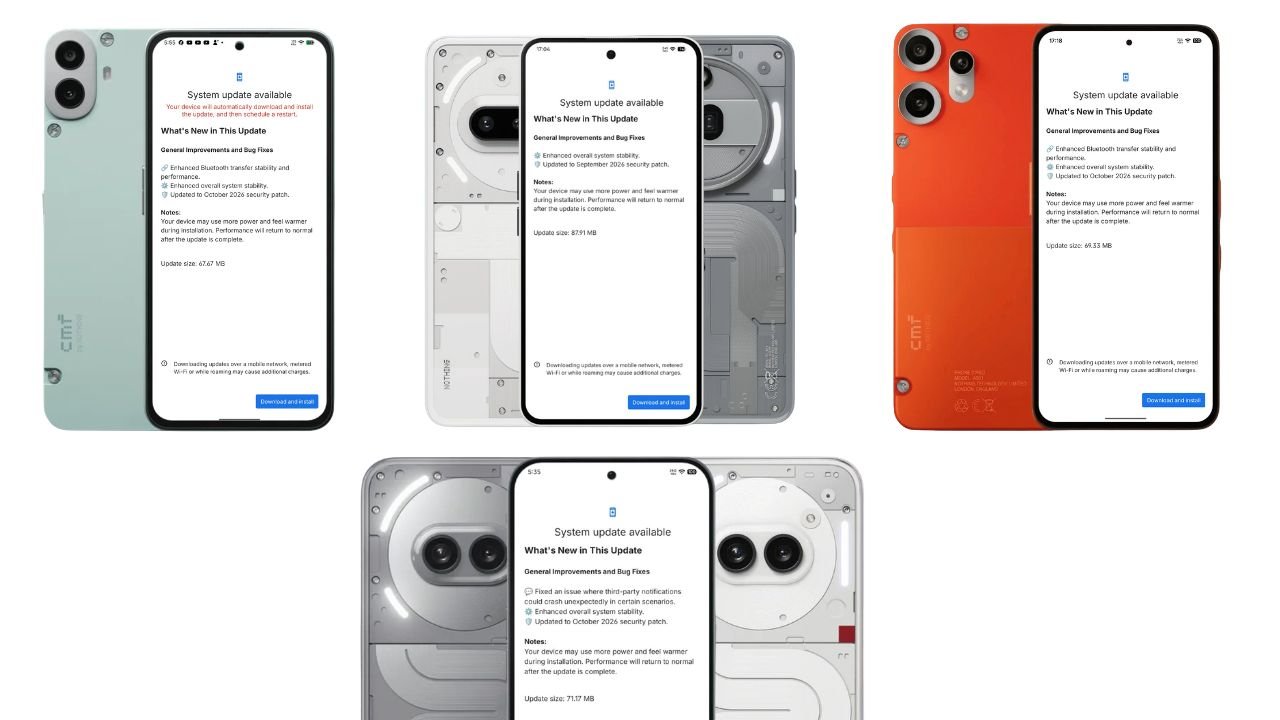
Nothing has started rolling out new Nothing OS 4.1 software updates for six smartphones across its Nothing and CMF lineups. The updates focus on system stability, bug fixes, Bluetooth transfer improvements, and the latest security patches.
The rollout covers the Nothing Phone (3a), Phone (3a) Pro, Phone (2a), Phone (2a) Plus, CMF Phone 2 Pro, and CMF Phone 1. While some devices are receiving improvements to Bluetooth connectivity, others are getting fixes for notification-related crashes.
Nothing OS 4.1 Update: Supported Devices and Update Sizes
Here is the complete list of devices receiving the updates, along with their respective download sizes.
| Smartphone | Update size | Security patch |
|---|---|---|
| Nothing Phone (3a) | 87.91 MB | September 2026 |
| Nothing Phone (3a) Pro | 87.91 MB | September 2026 |
| Nothing Phone (2a) | 71.17 MB | October 2026 |
| Nothing Phone (2a) Plus | 71.17 MB | October 2026 |
| CMF Phone 2 Pro | 69.33 MB | October 2026 |
| CMF Phone 1 | 67.67 MB | October 2026 |
Nothing Phone (3a) and Phone (3a) Pro Get Nothing OS 4.1 Update
The Nothing Phone (3a) and Phone (3a) Pro are receiving a new Nothing OS 4.1 update weighing 87.91 MB.
According to the update changelog, the latest firmware focuses on improving overall system stability and includes the September 2026 Android security patch.
Changelog:
- Enhanced overall system stability.
- Updated to the September 2026 security patch.
Nothing Phone (2a) and Phone (2a) Plus Receive October Update
The Nothing Phone (2a) and Phone (2a) Plus are receiving a 71.17 MB Nothing OS 4.1 update with bug fixes and security improvements.
One of the key changes addresses an issue where notifications from third-party applications could unexpectedly crash in certain scenarios. The update also enhances overall system stability and includes the October 2026 security patch.
Changelog:
- Fixed an issue where third-party notifications could crash unexpectedly in certain scenarios.
- Enhanced overall system stability.
- Updated to the October 2026 security patch.
CMF Phone 2 Pro Gets Nothing OS 4.1 Update
The CMF Phone 2 Pro is receiving a 69.33 MB software update. The latest firmware brings improvements to Bluetooth transfer reliability and overall system stability.
The update also includes the October 2026 security patch.
Changelog:
- Enhanced Bluetooth transfer stability and performance.
- Enhanced overall system stability.
- Updated to the October 2026 security patch.
CMF Phone 1 Receives Nothing OS 4.1 October Update
The CMF Phone 1 is also receiving a new Nothing OS 4.1 update, with a download size of 67.67 MB.
Similar to the CMF Phone 2 Pro update, this release improves Bluetooth transfer stability and performance, alongside general system stability improvements and the October 2026 security patch.
Changelog:
- Enhanced Bluetooth transfer stability and performance.
- Enhanced overall system stability.
- Updated to the October 2026 security patch.
How to Download the Latest Nothing OS 4.1 Update
Users can manually check for the latest software update on their smartphones by following these steps:
- Open Settings on your Nothing or CMF phone.
- Navigate to System and open System Update. The exact menu path may vary by software version.
- Check for available updates.
- If the update is available, tap Download and install.
- Follow the on-screen instructions to complete the installation.
As with other OTA software releases, availability may vary by device and rollout region. If the update has not appeared on your phone yet, check again later.
Final Thoughts
The latest Nothing OS 4.1 updates bring incremental but useful improvements across six Nothing and CMF smartphones. The Phone (2a) series receives a fix for third-party notification crashes, while the CMF Phone 1 and CMF Phone 2 Pro benefit from improved Bluetooth transfer stability.
It is worth noting that the Phone (3a) and Phone (3a) Pro update screens list the September 2026 security patch, whereas the other four devices list the October 2026 patch. Users should check their individual device’s update changelog to confirm which security patch is included.
Stay updated with latest tech news
Follow TechiBoy on Google to get updates on smartphones, gadgets, software updates, and more.
News
CMF by Nothing Announces Its First Portable Speakers, CMF Speaker S and Speaker M, Launching on October 12
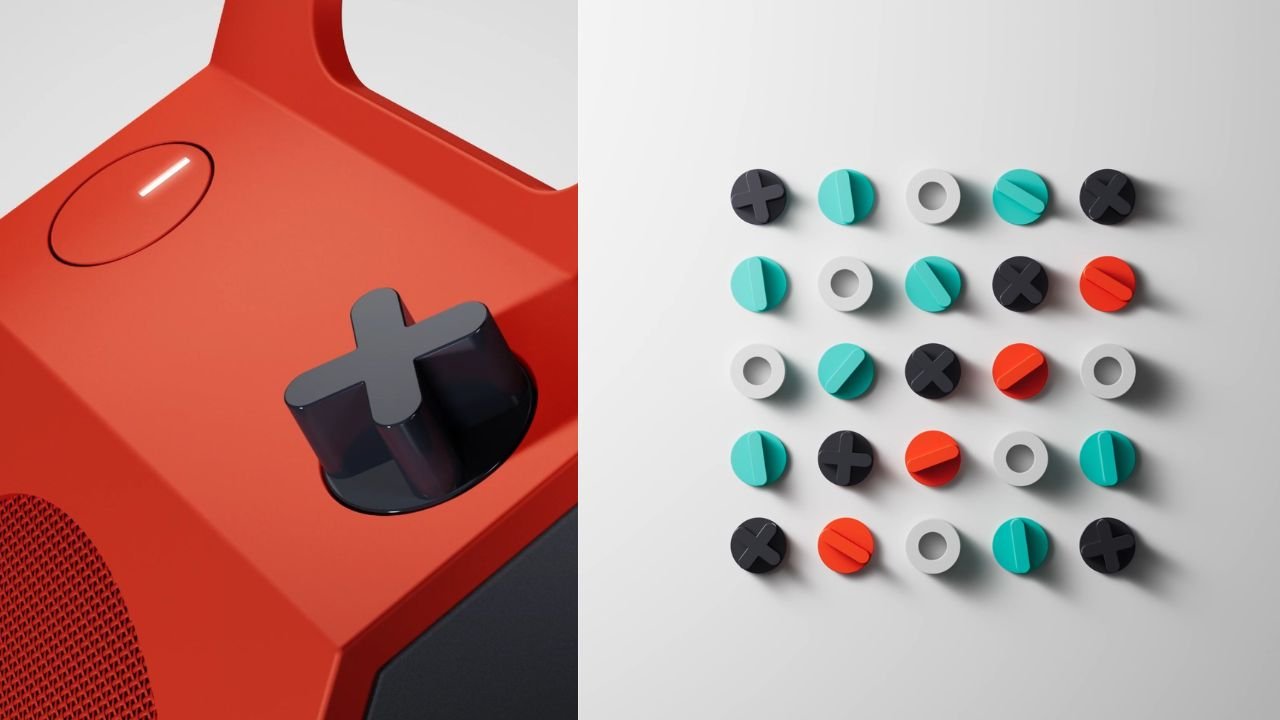
CMF by Nothing is preparing to enter the portable speaker market with its first speaker lineup. The brand has announced the CMF Speaker S and CMF Speaker M, which are scheduled to launch on October 12, 2026.
The announcement marks a new product category for CMF, which already offers smartphones, earbuds, headphones, smartwatches and accessories. The company teased the upcoming speakers on its official social media channels, revealing their names and launch date.
CMF Speaker S and Speaker M: What We Know So Far
CMF has shared a teaser featuring the upcoming speakers, but the company has yet to officially reveal their complete specifications, pricing and availability details.

The product names suggest that the lineup will include two models: the Speaker S and the Speaker M. Their designs appear to follow CMF’s distinctive approach, with bold styling and physical controls.
According to early images and reports, the speakers feature a box-like design with a built-in carrying handle and an orange control knob. The larger Speaker M has also appeared in leaked retail listings with two speaker grilles, while the smaller Speaker S features a single prominent grille.
These design details and reported specifications remain subject to confirmation at launch.
Launch Date and Availability
CMF by Nothing has confirmed that the Speaker S and Speaker M will launch on October 12, 2026. The company is expected to reveal their full specifications, features and pricing at the official launch.
Details regarding availability and pricing in India have not yet been officially confirmed.
Stay updated with latest tech news
Follow TechiBoy on Google to get updates on smartphones, gadgets, software updates, and more.