
News
Amazon Great Indian Festival 2026 Reveals OnePlus Smartphone Deals: OnePlus 13s at ₹49,999

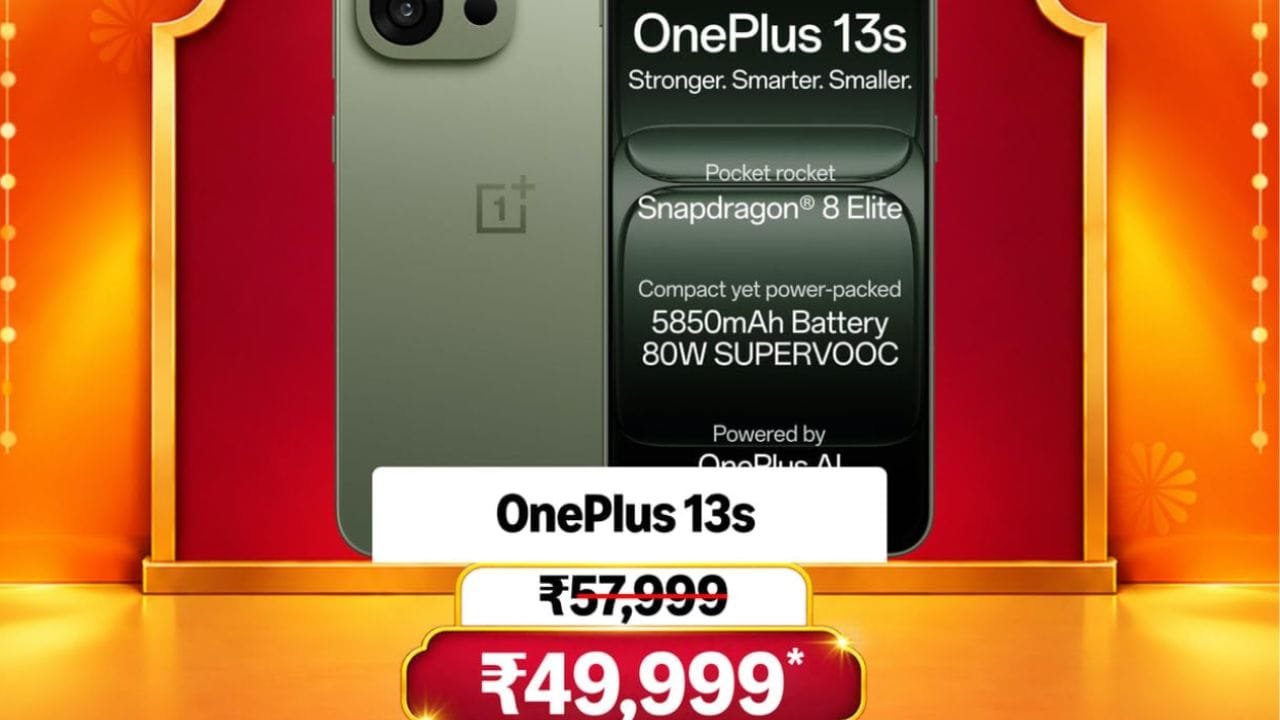
Amazon Great Indian Festival 2026 is almost here, and some interesting OnePlus smartphone deals have already started appearing on Amazon.
The sale officially begins on October 8, 2026, with Amazon offering discounts across smartphones and other categories. Customers can also get 10% instant savings on SBI Credit Cards, Debit Cards and Credit Card EMI transactions. Amazon has also announced exchange offers as part of the sale.
Among the OnePlus phones, the OnePlus 13s at ₹49,999 caught my attention. Here are the prices currently shown in the Amazon GIF banners:
OnePlus phones available at these prices
- OnePlus 15 — ₹81,999
- OnePlus 15R — ₹54,999
- OnePlus 13s — ₹49,999
- OnePlus N6 — ₹21,999
- OnePlus N6x — ₹17,499
- OnePlus N6 Lite — ₹14,749
- OnePlus Nord CE6 Lite — ₹27,499

The prices shown in the banners include the credit card EMI bank offer. The final price can vary depending on the payment method, eligibility and other applicable offers.

OnePlus 13s looks interesting
For me, the OnePlus 13s stands out from this list.
I really wanted to buy the OnePlus 13s when it launched, so seeing it at ₹49,999 during the Great Indian Festival definitely makes it interesting. It could be worth considering for someone looking for a compact OnePlus smartphone with flagship-level hardware.
OnePlus 13s Specifications
- Display: 6.32-inch 1.5K AMOLED, 120Hz
- Processor: Snapdragon 8 Elite
- RAM: 12GB LPDDR5X
- Storage: 256GB / 512GB
- Rear Camera: 50MP main + 50MP 2x telephoto
- Front Camera: 32MP autofocus
- Battery: 5,850mAh
- Charging: 80W SUPERVOOC
- OS: OxygenOS based on Android
- Weight: 185g
- Connectivity: 5G, Wi-Fi, Bluetooth
- Special: Plus Key, AI features, independent Wi-Fi chipset
- Colors: Green Silk, Black Velvet, Pink Satin
However, the price alone shouldn’t be the only reason to buy it. If you’re planning to purchase any of these phones, it is better to watch some reviews and check the camera, battery, performance and software experience before making the final decision.
The other OnePlus phones also have interesting prices, especially the N6 series. But since these are new deals, checking reviews and the exact exchange value for your existing phone would be a good idea.
Exchange offers and bank discounts
Amazon is also running its Exchange Mela during the Great Indian Festival, along with exchange offers across categories. The value of the exchange discount depends on the old device and its condition.
So, depending on the phone you’re exchanging and the payment method you use, the effective price of these OnePlus smartphones could be lower than the prices shown above.
The Amazon Great Indian Festival 2026 starts October 8, while early deals are already appearing on the platform.
Stay updated with latest tech news
Follow TechiBoy on Google to get updates on smartphones, gadgets, software updates, and more.





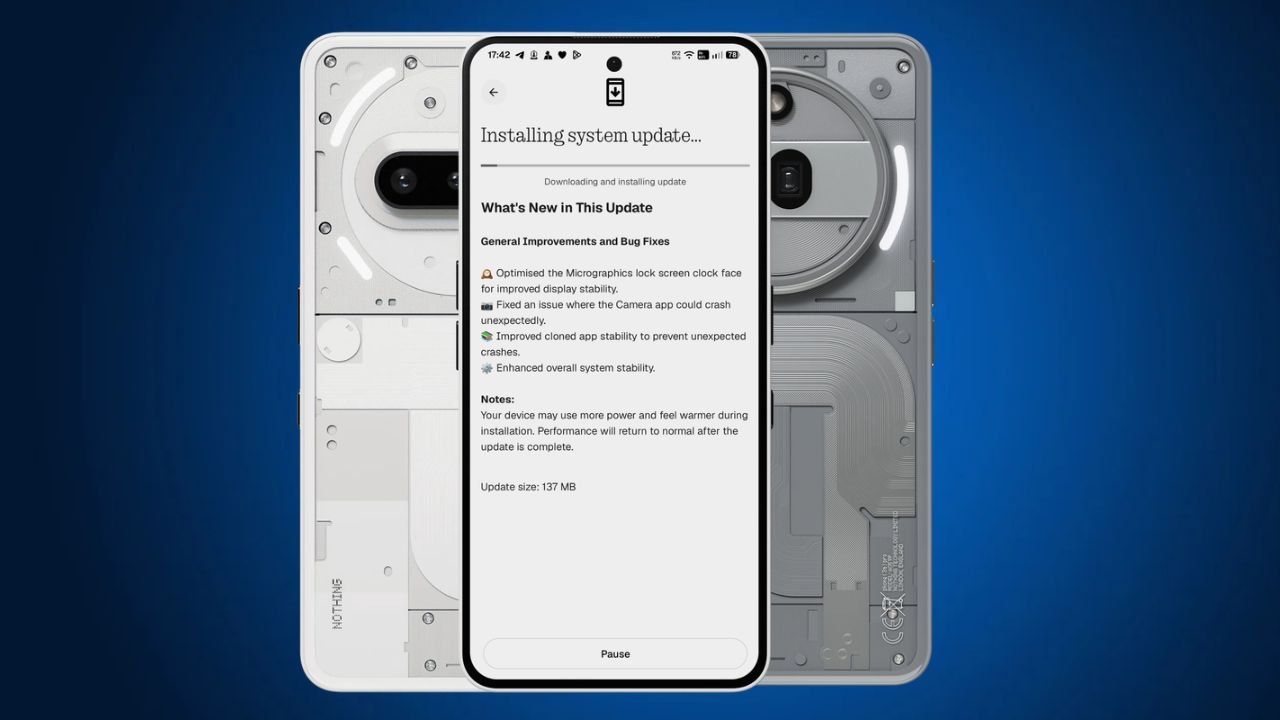
Nothing has started rolling out a new Nothing OS 5.0 Hotfix update for the Nothing Phone (3a) and Nothing Phone (3a) Pro. The latest update focuses on fixing a few issues and improving the overall system stability.
The update is around 137 MB in size and is rolling out to users in phases.
Nothing OS 5.0 Hotfix Update: What’s New?
One of the main changes in this Nothing OS 5.0 hotfix update is related to the Micrographics lock screen clock face. Nothing has optimised it to improve display stability.
Apart from this, the update also brings the following fixes:
- Micrographics Clock: Optimised the Micrographics lock screen clock face for better display stability.
- Camera Fix: Fixed an issue that could cause the Camera app to crash unexpectedly.
- Cloned Apps: Improved stability to prevent cloned apps from crashing unexpectedly.
- System Stability: Improved overall system stability for a smoother experience.
Nothing OS 5.0 Hotfix Update Details
Here are the update details for the Nothing Phone (3a) and Phone (3a) Pro:
| Details | Information |
|---|---|
| Devices | Nothing Phone (3a) and Phone (3a) Pro |
| Software | Nothing OS 5.0 |
| Build Number | C5.0-261106-1007 |
| Update Size | 137 MB |
| Update Type | Hotfix Update |
How to Download the Update?
Nothing Phone (3a) and Phone (3a) Pro users can check for the latest update by following these steps:
- Open Settings on your phone.
- Go to System.
- Select System Update.
- Tap Check for Update.
- Download and install the update if it is available.
The update is rolling out gradually, so it may take some time to reach all users.
Stay updated with latest tech news
Follow TechiBoy on Google to get updates on smartphones, gadgets, software updates, and more.
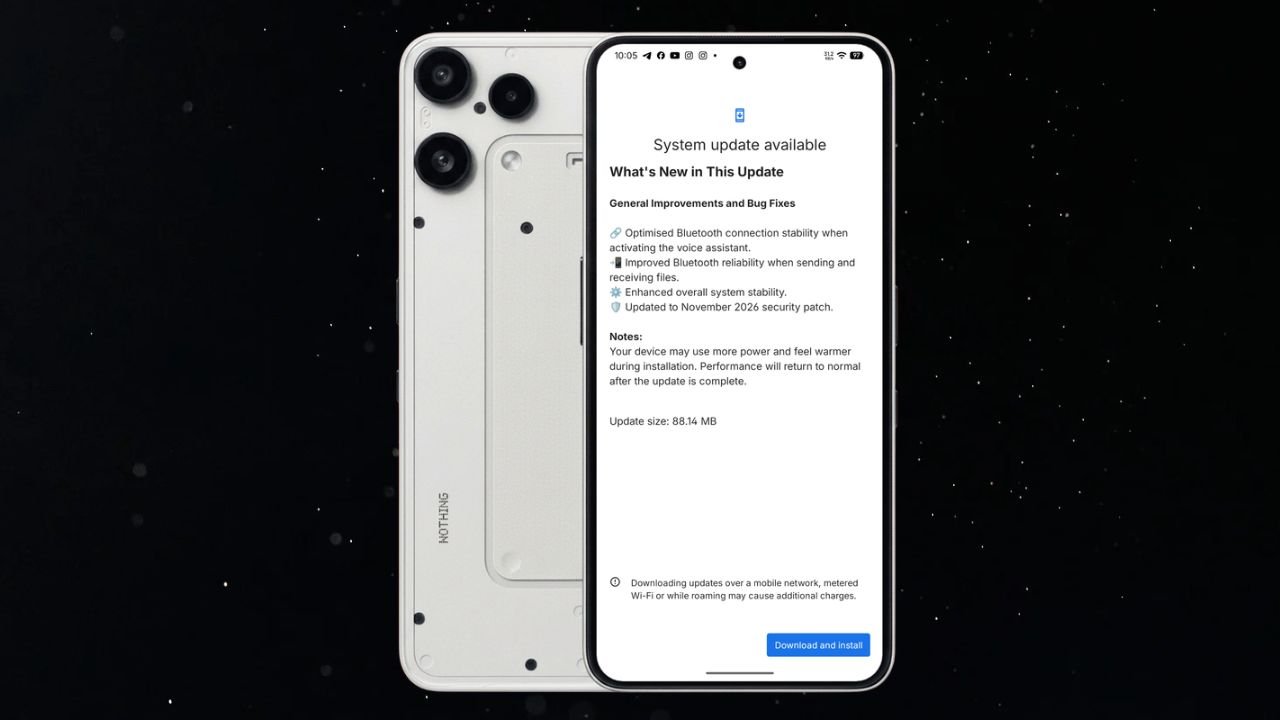
Nothing has started rolling out a new Nothing OS 4.1 November update for the Nothing Phone (3a) Lite. The latest update brings Bluetooth improvements, better system stability, and the November 2026 security patch.
The update is relatively small, with a download size of 88.14 MB. It mainly focuses on improving the overall user experience rather than introducing new features.
Nothing Phone (3a) Lite Nothing OS 4.1 November Update Details
The latest update comes with build number Nothing OS B4.1-261029-1756 for Phone (3a) Lite. It includes several improvements related to Bluetooth connectivity and general system performance.
Here are the update details:
- Device: Nothing Phone (3a) Lite
- Software Version: Nothing OS 4.1
- Build Number: B4.1-261029-1756
- Update Size: 88.14 MB
- Security Patch: November 2026
What’s New in the November Update?
According to the changelog, the update brings the following changes:
1. Improved Bluetooth Stability
Nothing has optimised Bluetooth connection stability when activating the voice assistant. This should make the Bluetooth connection more reliable when using a connected device to access the voice assistant.
2. Better Bluetooth File Sharing
The update also improves Bluetooth reliability when sending and receiving files. This should help provide a more stable experience during Bluetooth file transfers.
3. Enhanced System Stability
Nothing has made improvements to overall system stability. These changes aim to make the phone’s software experience more reliable.
4. November 2026 Security Patch
The update also includes the November 2026 Android security patch to keep the device up to date with the latest security improvements.
How to Download the Update?
Nothing Phone (3a) Lite users can check for the latest update by following these steps:
- Open Settings on your phone.
- Go to System.
- Select System Update.
- Check for the latest available update.
- Download and install latest Nothing OS 4.1.
If the update is not available on your device yet, you can check again later.
Stay updated with latest tech news
Follow TechiBoy on Google to get updates on smartphones, gadgets, software updates, and more.
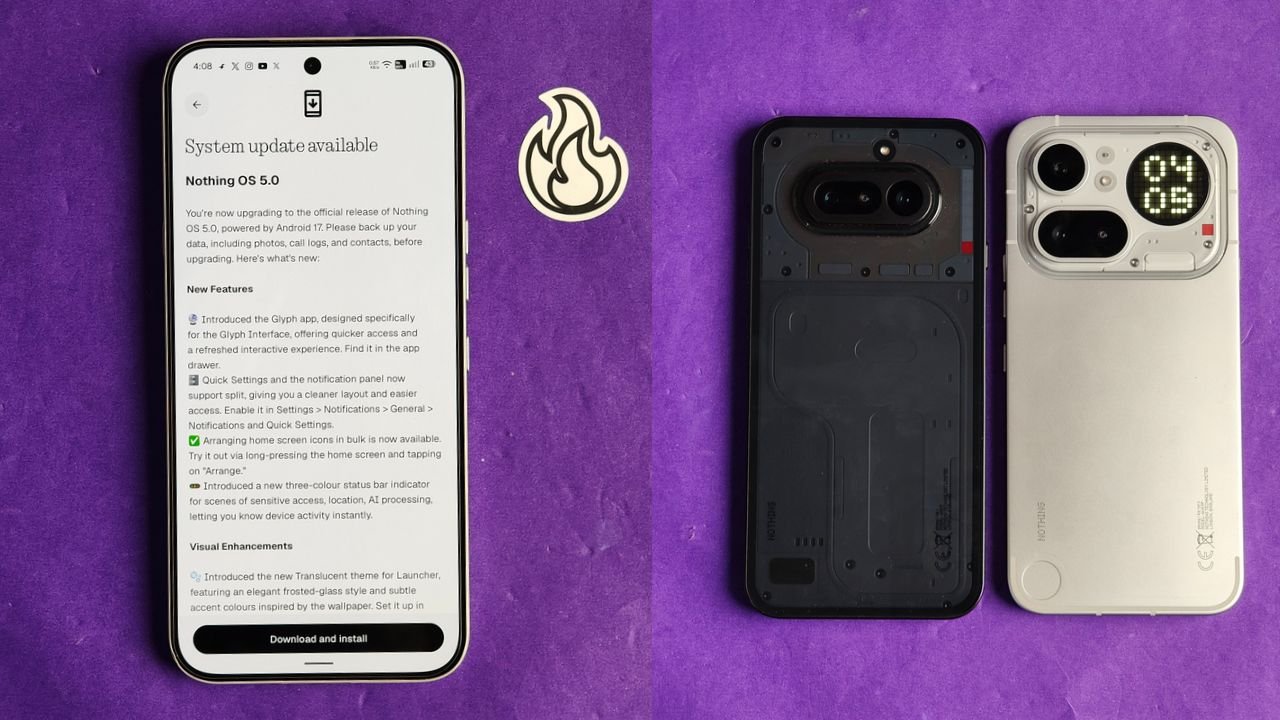
Nothing has started rolling out the stable Nothing OS 5.0 update for the Nothing Phone (4a) and Nothing Phone (4a) Pro. The new update is based on Android 17 and brings several new features, visual changes, camera improvements and other system enhancements.
The stable rollout has started ahead of Nothing’s previously announced early November schedule. However, the update is being released in stages, so it may take some time to reach all users.
Nothing OS 5.0 Update Size
The update is around 1.70 GB in size for beta users, and for non-beta users it is around 3 GB. Users can check for the latest update by going to Settings > System > System update.
What’s New in Nothing OS 5.0?
Nothing OS 5.0 brings quite a few changes to the overall user experience. Here are some of the important additions.
New Glyph App and Split Notifications
Nothing has introduced a dedicated Glyph app that makes it easier to access and manage Glyph Interface features.
The notification panel and Quick Settings can now be separated, giving users more control over how they access notifications and system shortcuts.
There is also a new three-colour status bar indicator that helps users identify sensitive activities such as location access and AI processing.
New Translucent Theme
One of the biggest visual changes is the new Translucent theme for the launcher.

It brings a frosted-glass look with subtle accent colours inspired by your wallpaper. You can enable it by going to Customisation > Theme & Style > Translucent.
Nothing has also added two new lock screen clock faces and the option to customise the clock colour.
New Widgets
The update introduces new widgets, including:
- Collector: Turns your photos into different decorative styles for your home screen.
- Away Time: Tracks how much time you spend away from your phone.
- Glyph Timer: Lets you access the Glyph Timer directly from the widget drawer.
Users can also arrange multiple home screen icons together instead of moving them one by one.
Camera Improvements
Nothing OS 5.0 brings several camera improvements to the Phone (4a) series.
The biggest addition is Dual-view Video, which allows users to record videos using the front and rear cameras simultaneously.
Nothing has also improved video recording, zoom, close-up photography, QR scanning, Google Lens and Motion Photo playback. The camera interface, controls and animations have also been refreshed.
Other Improvements
Apart from these changes, the update includes several smaller improvements:
- Expanded Dark Theme for more apps.
- Enhanced HDR brightness controls.
- Improved Depth wallpapers with pinch-to-resize support.
- Better Live Updates experience.
- Noto 3D Emoji support in Gboard.
- Faster Essential Voice transcriptions.
- Improved lock screen shortcuts.
- One-tap Bluetooth connection and disconnection.
- Refined system animations and a refreshed Settings interface.
How to Download Nothing OS 5.0
If you own a Nothing Phone (4a) or Phone (4a) Pro, follow these steps to check for the update:
- Open Settings on your phone.
- Go to System.
- Tap System update.
- Select Check for updates.
If the update is not available yet, don’t worry. Nothing is following a staged rollout, and it should reach more devices over the coming days.
Before installing, make sure to back up your important data and keep enough battery charge.
Stay updated with latest tech news
Follow TechiBoy on Google to get updates on smartphones, gadgets, software updates, and more.