
Android
Kea 2.0 Update: On-Device AI, Action Wheel and New Customization Features

Kea: Button Remapper has received its biggest update yet. With version 2.0, TechiBoy Studios has rebuilt the app from the ground up, bringing several new features, improved customization options, and a completely new approach to hardware button remapping.
Kea lets you remap your phone’s hardware buttons to perform different actions, launch apps, and access useful shortcuts. For example, Nothing Phones come with the Essential Key, which is primarily designed for Essential Space and other built-in actions. With Kea, you can remap it to perform a wide range of actions and customize how it works. Kea also supports Android phones without a dedicated extra hardware key, allowing you to remap existing buttons such as the long-press power button and volume buttons to trigger different actions.
While the original Kea focused on turning unused hardware buttons into useful shortcuts, Kea 2.0 takes things much further. The update introduces Kea AI, a collection of on-device AI tools, alongside features such as Action Wheel, Contextual Actions, Action Lab, Floating Clipboard, Global Search and more.
The interesting part is that Kea AI processes content directly on your device, meaning you can use several AI-powered features without needing an internet connection.
Let’s take a closer look at everything new in Kea 2.0.
1. Kea AI: On-device AI features
One of the biggest additions in Kea 2.0 is Kea AI.
Instead of relying on a cloud-based AI chatbot, Kea brings several practical AI tools directly to your smartphone. These tools can help you translate content, extract text, remove backgrounds, look up word meanings and hide private information.

Kea AI includes five main tools.
Translate
The Translate feature lets you read and translate content in your preferred language without leaving the app you’re currently using.
Simply trigger the assigned hardware button while viewing content, and Kea displays the translation in its own interface.

It supports 41 languages, with downloadable language packs that allow translation to work offline.
Cut Out
Cut Out makes it easier to remove the background from an image.
Open an image in any app, trigger the assigned Kea action, and the app separates the subject from its background.

You can then turn the result into a sticker, save it, or copy it and drag it into another application.
Look Up
Look Up is an offline dictionary feature that lets you find the meaning of words instantly.
Select or tap a word, trigger the assigned button, and Kea displays its meaning in a small card without requiring you to leave the current app.

It’s particularly useful when reading articles, documents or other long-form content.
Grab Text
Grab Text extracts useful information from almost anything visible on your screen.
It can identify:
- Text
- Email addresses
- Phone numbers
- Website links

It also works with images, screenshots, posters and paused videos.
Once the information is extracted, you can copy it, share it, or use the detected links and contact information directly.
Redact
Redact is designed to help protect personal information before sharing screenshots.
It can identify and cover sensitive details such as email addresses, phone numbers and faces.

For example, if you want to share a booking confirmation, you can use Redact to hide private information before sending the screenshot to someone else.
2. Action Wheel: A new way to access shortcuts
Action Wheel is another major addition to Kea 2.0.
Instead of assigning every action to a separate press gesture, you can now open a circular action launcher using a long press.
Once the Action Wheel appears, simply swipe through the available actions and release to launch the selected one.

You can access different shortcuts, including quick toggles, media controls and Kea AI tools.
The idea is simple: keep multiple actions available without having to remember different button combinations.
3. Contextual Actions: One button, different actions in different apps
Kea 2.0 introduces Contextual Actions, which allow the same hardware button to perform different tasks depending on the application you’re currently using.
For example:
- In Camera, the button can capture a photo.
- In YouTube, it can pause or resume a video.
- During a call, it can end the call.
- In Maps, it can save a location.

Each rule can be configured independently.
This makes the hardware button more useful because its functionality can change depending on what you’re doing on your phone.
4. Action Lab: Create automated action sequences
Action Lab is one of the more advanced features introduced in Kea 2.0.
It allows you to combine multiple actions into a single sequence and execute them with one button press.
You can arrange actions and apps in the order you want, then configure conditions that determine when the sequence should run.

For example, you could create a sequence that turns on the torch, enables Glyph lights and performs another selected action.
Kea 2.0 also introduces condition-based execution. You can configure a sequence to run only when certain conditions are met, such as:
- Headphones are connected.
- Media is playing.
- The phone is charging.
- The screen is locked.
You can test your sequence before saving it, making it easier to check whether everything works as expected.
5. Floating Clipboard: Your content is always accessible
The new Floating Clipboard keeps your copied content within easy reach.
It provides a floating panel that slides in from the side of your screen, giving you quick access to saved text, links, images and notes.
You can search through your saved content, drag a card into another application, or tap it to paste.

This is particularly useful when switching between apps or repeatedly using the same information.
Kea only keeps the content you add to your clipboard, giving you control over what stays available.
6. Global Search: Find actions and settings faster
Kea 2.0 also introduces a unified search experience.
Instead of navigating through multiple sections to find a particular action or setting, you can search for it directly.
The search understands everyday words and helps you find the relevant action, setting or binding more quickly.
It also works offline.
7. More actions and smarter button customization
Kea has always focused on making hardware buttons more useful, and version 2.0 expands that functionality further.
The app supports four primary gestures:
- Single press
- Double press
- Triple press
- Long press
You can use these gestures to trigger different actions, launch applications, control media or access system functions.
Kea also introduces a smarter action picker that understands everyday words, making it easier to find the action you’re looking for.
Some of the additional bindings include:
- Brightness controls
- Night Light
- Extra Dim
- Read Aloud
- Wallet
- ChatGPT
- Internet settings
- Bluetooth settings
- Glyph lights
You can also configure volume buttons and the long-press action of the power button.
Kea is not limited to a predefined list of supported phones. It learns the hardware key through its fingerprint during setup, allowing it to work with different Android devices.
8. App Sidebar: Your favourite apps, always within reach
App Sidebar is another useful addition available with Kea Pro.
It provides a floating dock containing your favourite applications and actions.

You can open the sidebar from the edge of your screen and launch apps without leaving what you’re currently doing.
Kea 2.0 also supports opening applications in floating pop-up windows on compatible devices.
For example, you can open a calculator or messaging application in a floating window while continuing to use another app.
You can also customize the sidebar layout by choosing the number of columns and rows.
9. More customization options
Kea 2.0 brings additional customization options for users who want to personalize the experience.
You can customize the visual feedback shown when a hardware button action is triggered.
Available options include:
- Different visual overlay shapes
- Custom accent colours
- Glow and capsule styles
- Animation settings
- Overlay positioning
- Haptic feedback
- Lock screen feedback
You can also configure feedback separately for individual gestures.
The lock screen settings allow you to decide which gestures should continue working while your phone is locked.
10. Features designed specifically for Nothing Phones
Kea was originally built around the Nothing Essential Key, and version 2.0 continues to bring features designed specifically for Nothing devices.
These include:
Glyph Timer: Start a Glyph Timer directly through a hardware button. Your phone’s Glyph lights can display the countdown.
Glyph Torch: Control your phone’s Glyph lights with a shortcut.
Quick Record: Quickly start recording a voice note or call, depending on device and regional availability.
These features make Kea particularly interesting for Nothing Phone users, although the app also supports other Android devices with compatible hardware buttons.
11. What’s free and what’s included in Kea Pro?
Kea remains free to download, but some advanced features are available through Kea Pro.
Kea Pro is a one-time purchase rather than a monthly or yearly subscription. Users can purchase it once to unlock the Pro features permanently.
The free version continues to offer core button remapping, essential actions and customization options.
Kea Pro unlocks additional capabilities, including advanced AI tools, Action Wheel, Action Lab, Floating Clipboard, App Sidebar, additional customization and more.
The pricing is ₹199 in India and US$5.99 in the US, with regional pricing in other markets.
12. Privacy: What stays on your phone?
Privacy is an important part of Kea 2.0.
The app processes text and images locally on your device for its on-device AI features. Your content is not sent to a cloud AI chatbot for processing.
However, some features require internet access for specific purposes, such as downloading language packs and AI models, checking Kea Pro purchases and generating previews for links you save to the Floating Clipboard.
Kea also provides transparency about the permissions it uses and why they are required.
Compatibility and availability
Kea: Button Remapper 2.0 supports Android 13 and newer.

It works with compatible hardware buttons, including spare programmable buttons, volume keys and supported power-button gestures.
The app is available on the Google Play Store.
Stay updated with latest tech news
Follow TechiBoy on Google to get updates on smartphones, gadgets, software updates, and more.





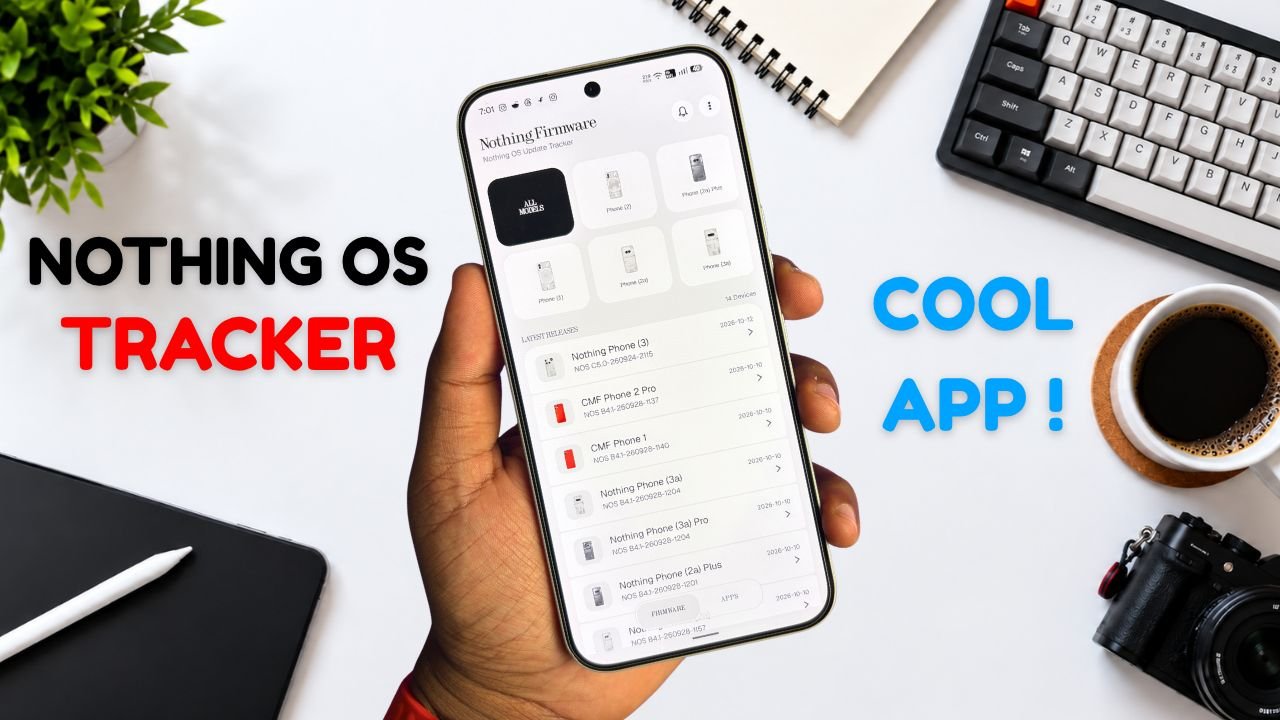
Nothing Phone and CMF users now have a new way to keep track of software updates. Nothing Firmware, an Android app developed by TechiBoy Studios, is now available on Google Play.
The app brings firmware update tracking, changelogs, Nothing OS OTA package downloads, and information on Nothing app updates into one place. It is designed for users who want to stay informed about the latest software releases for their devices.

What Is the Nothing Firmware App?
Nothing Firmware is an independent app built to help Nothing Phone and CMF users follow firmware releases without having to search across multiple sources.
Users can check available firmware updates, read changelogs to understand what’s changed, and download OTA packages through the app. It also tracks Nothing app updates and provides direct links to their Google Play listings.
Nothing Firmware App Features
The app includes several features designed to make software update tracking easier.
- Firmware tracking: Follow firmware releases for Nothing Phone and CMF devices.
- Detailed changelogs: Check update details and learn about new features, improvements, and bug fixes.
- OTA downloads: Download firmware packages with progress tracking.
- Update notifications: Receive alerts when new firmware releases are available.
- Nothing app updates: Track Nothing app releases and open their Google Play listings directly.
- Home screen widget: View the latest firmware information from the home screen.
- Custom alerts: Choose notification sounds and enable voice announcements for update alerts.
- Theme options: Switch between Auto, Light, and true-black Dark themes.
- Device information: Check device details, build numbers, and security patch information.
The app also includes a warning for firmware packages that do not match the detected device, helping users avoid selecting an incorrect package.
Is Nothing Firmware an Official Nothing App?
No. Nothing Firmware is an independent community project developed by TechiBoy Studios. It is not affiliated with, sponsored by, or endorsed by Nothing Technology Limited or CMF by Nothing.

How to Download Nothing Firmware
Nothing Firmware is available on Google Play. Users can download it to keep track of firmware updates, read changelogs, and follow Nothing app releases.
Download: Nothing Firmware on Google Play
If you’re already running an incremental build of Nothing OS 5.0 Open Beta, you can’t directly roll back to the stable version through a regular incremental OTA update. Nothing Firmware currently provides stable incremental updates only. Once Nothing releases the Nothing OS 5.0 stable update for your device, it will appear in the app when available. Until then, you may need to follow Nothing’s official rollback instructions if you want to return to a stable build.
Stay updated with latest tech news
Follow TechiBoy on Google to get updates on smartphones, gadgets, software updates, and more.
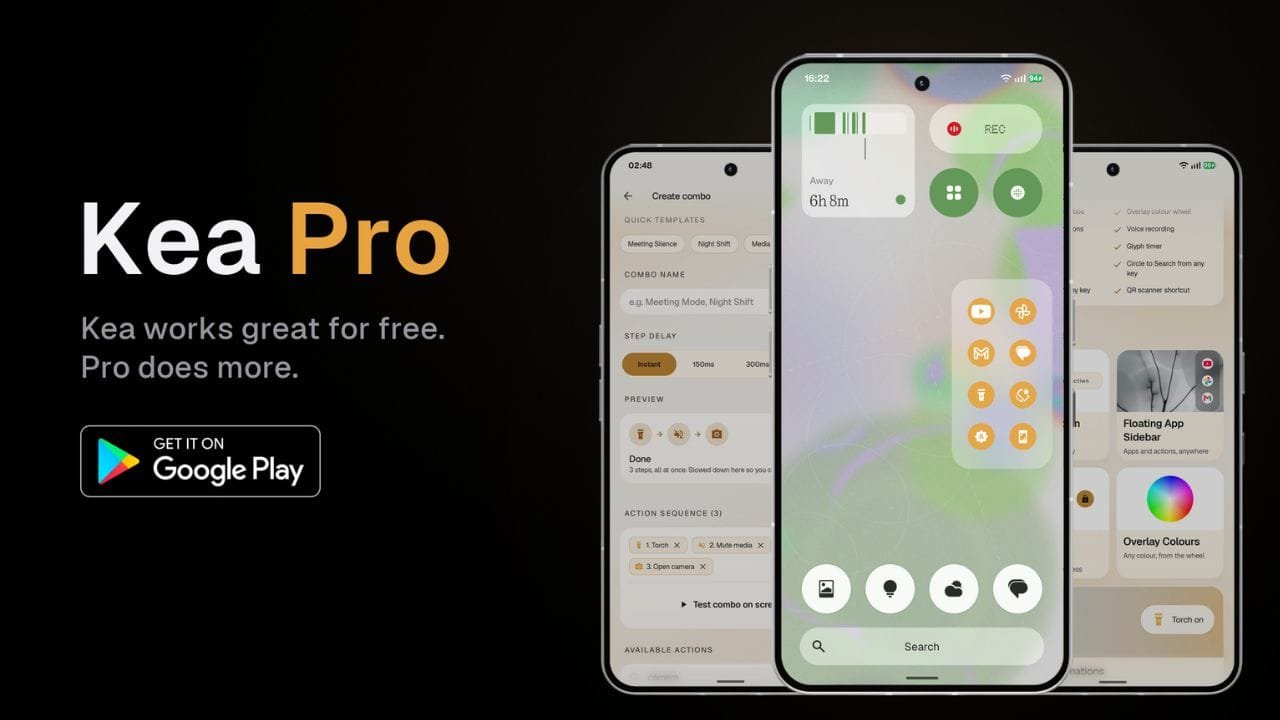
Kea: Button Remapper has received a major update that brings a new Floating App Sidebar, Action Combos, more customization options and several new features for Android users.
The update also brings a redesigned user interface with improved animations, blur effects and a cleaner overall look. While Kea remains available as a free app, some of the new features are available through the paid Kea Pro version.
Floating App Sidebar
One of the main additions in the update is the new Floating App Sidebar. It allows users to pin their favorite apps and actions and quickly access them from anywhere on the phone.
Users can add apps such as YouTube, Instagram, Gmail, games, and more, as well as actions, to the sidebar. The sidebar also supports customization for its position, number of rows and columns, background, icon style, and accent color.

The background can be changed between transparent, translucent and solid styles. Users can also choose different icon styles and customize the sidebar’s color using the available color options and color wheel.
Action Lab Combos
Another new feature is Action Lab Combos. It allows users to perform multiple actions with a single button press.
For example, users can create a shortcut that mutes media volume and enables Do Not Disturb at the same time. This can be useful during meetings when multiple settings need to be changed quickly.

Users can also create their own custom combos by selecting multiple actions and arranging them into a sequence.
Voice and Call Recording
Kea Pro also adds shortcuts for voice recording and call recording using the Nothing Recorder widget.

After setting up the required Recorder widget, users can assign a button press to start or stop recording. Saved recordings can then be accessed through the Nothing Recorder app.
More Customization
The update brings several new options for Kea’s visual overlays. Users can choose different styles, including Dark, Frosted and Smoke themes.

There are also different animation effects, while the position of the overlay can be adjusted for different hardware keys. Kea Pro users can further customize the accent color and use a color wheel for more control over the appearance.
More Features for Nothing Phones
Kea Pro also includes several features designed for Nothing Phone users. These include Glyph Torch and Glyph Timer shortcuts.
Users can assign these features to different button gestures. The app also supports shortcuts such as Circle to Search, QR code scanning and additional hardware button actions.

The app also supports volume button mapping and power button customization, giving users more ways to control different actions using physical buttons.
Free Version Still Available
Kea: Button Remapper continues to offer a free version with more than 30 actions and support for four different button gestures. The free version also includes features such as visual overlays, lock screen controls and a Quick Settings tile.
The Floating App Sidebar, Action Combos, volume button mapping, voice and call recording, Glyph shortcuts and other additional features are available with Kea Pro.
Kea Pro is offered as a one-time lifetime purchase, giving users permanent access to the Pro features after purchasing it.
Here is the app link: https://play.google.com/store/apps/details?id=com.techiboystudios.kea
The latest update also significantly refreshes the Kea interface. TechiBoy Studios will bring more features that are planned for future updates, so the list of available features is expected to grow over time.
Stay updated with latest tech news
Follow TechiBoy on Google to get updates on smartphones, gadgets, software updates, and more.
Google has released Android 17 Beta 3 for developers, around a month after the previous beta. With this update, Android 17 has reached platform stability, which means the main features and system behavior are now finalized.
Available for Pixel Devices
Android 17 Beta 3 is available for Pixel 6 and newer devices, including:
- Pixel 6 and newer models
- Pixel Tablet
- Pixel Fold
Users who are enrolled in the beta program will receive the update over the air.
Key Features and Changes
Google has added several new features and improvements in this update:
- Support for RAW14 image format for better image processing
- Option to hide app labels on the home screen
- Improved audio routing for hearing aids
- Redesigned screen recording toolbar
- Better widget scaling on larger displays


Security Update Included
The update also includes the March Android security patch, which improves system security and stability.
Stable Release Timeline
The stable version of Android 17 is expected to be released around June.

Overall, Android 17 Beta 3 brings useful improvements and shows that the final version is getting closer to launch.
Stay updated with latest tech news
Follow TechiBoy on Google to get updates on smartphones, gadgets, software updates, and more.