
Android
Google Releases Android 17 Beta 3 with New Features and Improvements

Google has released Android 17 Beta 3 for developers, around a month after the previous beta. With this update, Android 17 has reached platform stability, which means the main features and system behavior are now finalized.
Available for Pixel Devices
Android 17 Beta 3 is available for Pixel 6 and newer devices, including:
- Pixel 6 and newer models
- Pixel Tablet
- Pixel Fold
Users who are enrolled in the beta program will receive the update over the air.
Key Features and Changes
Google has added several new features and improvements in this update:
- Support for RAW14 image format for better image processing
- Option to hide app labels on the home screen
- Improved audio routing for hearing aids
- Redesigned screen recording toolbar
- Better widget scaling on larger displays


Security Update Included
The update also includes the March Android security patch, which improves system security and stability.
Stable Release Timeline
The stable version of Android 17 is expected to be released around June.

Overall, Android 17 Beta 3 brings useful improvements and shows that the final version is getting closer to launch.
Stay updated with latest tech news
Follow TechiBoy on Google to get updates on smartphones, gadgets, software updates, and more.





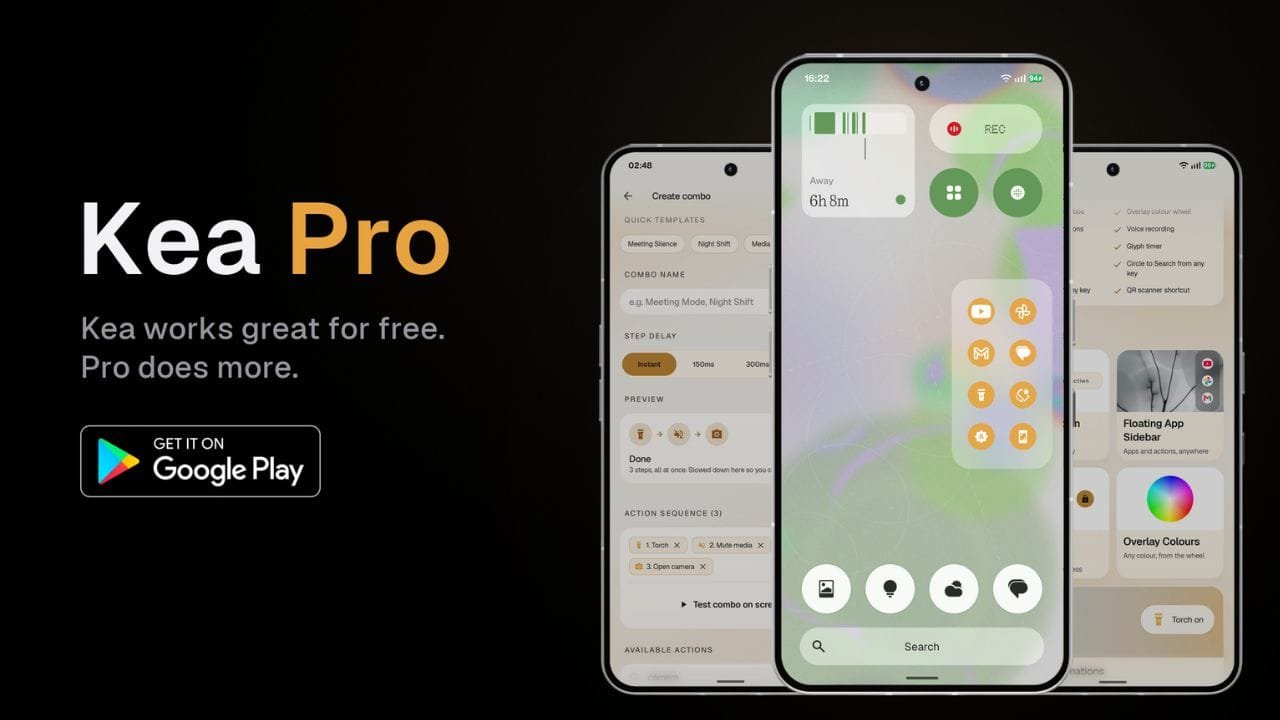
Kea: Button Remapper has received a major update that brings a new Floating App Sidebar, Action Combos, more customization options and several new features for Android users.
The update also brings a redesigned user interface with improved animations, blur effects and a cleaner overall look. While Kea remains available as a free app, some of the new features are available through the paid Kea Pro version.
Floating App Sidebar
One of the main additions in the update is the new Floating App Sidebar. It allows users to pin their favorite apps and actions and quickly access them from anywhere on the phone.

Users can add apps such as YouTube, Instagram, Gmail, games, and more, as well as actions, to the sidebar. The sidebar also supports customization for its position, number of rows and columns, background, icon style, and accent color.

The background can be changed between transparent, translucent and solid styles. Users can also choose different icon styles and customize the sidebar’s color using the available color options and color wheel.
Action Lab Combos
Another new feature is Action Lab Combos. It allows users to perform multiple actions with a single button press.
For example, users can create a shortcut that mutes media volume and enables Do Not Disturb at the same time. This can be useful during meetings when multiple settings need to be changed quickly.

Users can also create their own custom combos by selecting multiple actions and arranging them into a sequence.
Voice and Call Recording
Kea Pro also adds shortcuts for voice recording and call recording using the Nothing Recorder widget.

After setting up the required Recorder widget, users can assign a button press to start or stop recording. Saved recordings can then be accessed through the Nothing Recorder app.
More Customization
The update brings several new options for Kea’s visual overlays. Users can choose different styles, including Dark, Frosted and Smoke themes.

There are also different animation effects, while the position of the overlay can be adjusted for different hardware keys. Kea Pro users can further customize the accent color and use a color wheel for more control over the appearance.
More Features for Nothing Phones
Kea Pro also includes several features designed for Nothing Phone users. These include Glyph Torch and Glyph Timer shortcuts.
Users can assign these features to different button gestures. The app also supports shortcuts such as Circle to Search, QR code scanning and additional hardware button actions.

The app also supports volume button mapping and power button customization, giving users more ways to control different actions using physical buttons.
Free Version Still Available
Kea: Button Remapper continues to offer a free version with more than 30 actions and support for four different button gestures. The free version also includes features such as visual overlays, lock screen controls and a Quick Settings tile.
The Floating App Sidebar, Action Combos, volume button mapping, voice and call recording, Glyph shortcuts and other additional features are available with Kea Pro.
Kea Pro is offered as a one-time lifetime purchase, giving users permanent access to the Pro features after purchasing it.
Here is the app link: https://play.google.com/store/apps/details?id=com.techiboystudios.kea
The latest update also significantly refreshes the Kea interface. TechiBoy Studios will bring more features that are planned for future updates, so the list of available features is expected to grow over time.
Stay updated with latest tech news
Follow TechiBoy on Google to get updates on smartphones, gadgets, software updates, and more.
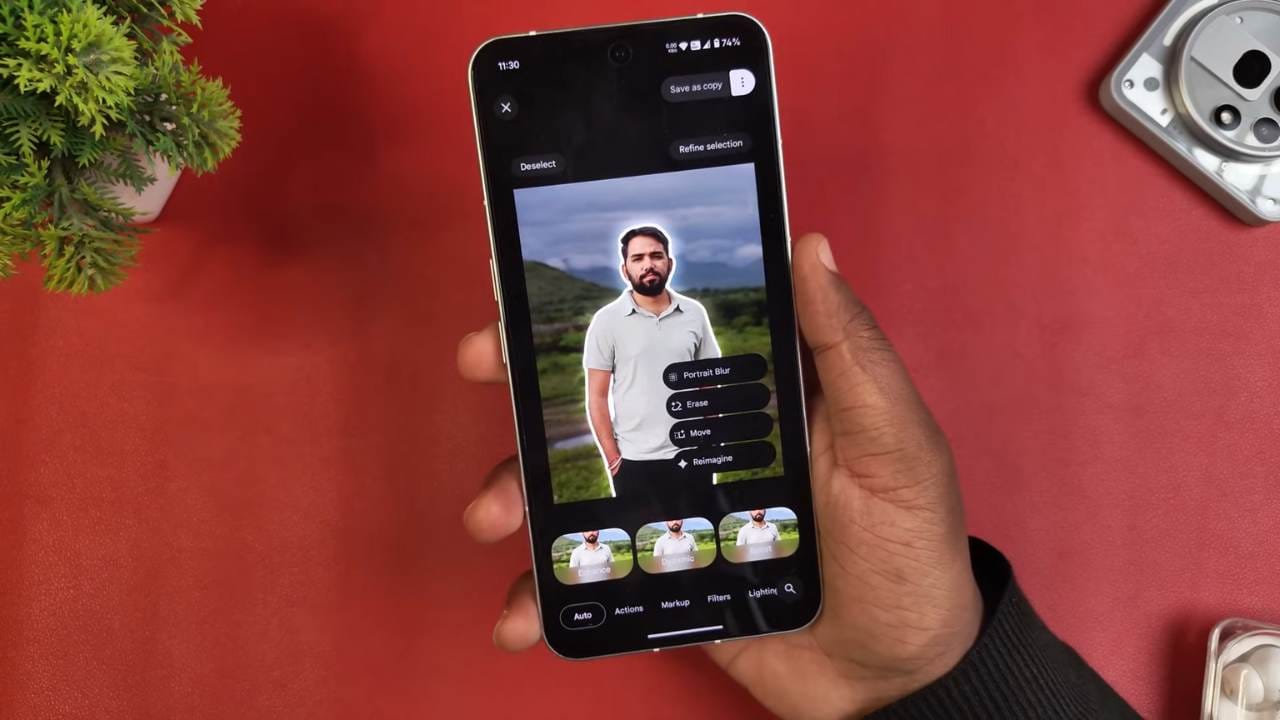
Google Photos has started rolling out a new update that introduces powerful AI editing tools along with a fresh user interface. The highlight of this update is the “Reimagine” feature, which lets users edit and transform their photos in completely new ways.
With this update, users can now:
- Erase objects from photos with just a tap.
- Move objects around within an image.
- Apply portrait blur to the background.
- Experiment with Sky Styles to change how the sky looks.
- Use Reimagine to change colors, add new elements like airplanes, or even transform objects into something different.

The update is rolling out through the Google Play Store, so users only need to update their Google Photos app to the latest version. The features are already appearing on many Android devices, including Nothing Phones.
While Nothing’s own Gallery app doesn’t yet include AI editing, Google Photos is filling that gap by offering advanced tools. Users have already tested features like erasing cars, changing their colors, and adding new objects seamlessly into photos.
Overall, this update makes Google Photos a powerful editing tool, giving Android users easy access to AI-driven creativity right inside their photo gallery.
Stay updated with latest tech news
Follow TechiBoy on Google to get updates on smartphones, gadgets, software updates, and more.

Google has rolled out a new update for its Phone app (Google Dialer), which is available on Nothing Phones, some OnePlus devices, and other Android smartphones. The update brings a redesigned user interface and a brand-new feature called Calling Card.
Redesigned User Interface
The latest version of the Google Dialer comes with a refreshed look inspired by Android 16’s design. The call history page, calling screen, and incoming call screen have all been updated. Users will now notice bigger buttons for the keypad, mute, and speaker options, making it easier to use. Animations have also been added to the calling screen, such as circular effects while a call is connecting, which stop once the call is answered.
Google has also introduced a new option for incoming call gestures. Instead of only swiping to answer or reject, users can now enable a single-tap gesture for quick response. This makes handling calls faster and more convenient.
Calling Card Feature
One of the most exciting additions is the Calling Card feature. With this, users can customize how their contact photo and details appear during calls. You can upload a profile picture from your camera, gallery, or Google Photos, adjust its position, zoom in or out, and even customize fonts and colors.
This feature allows each contact to have a unique look when calling, making the experience more personal and visually appealing.
Availability
Currently, the update has been spotted on Nothing Phone (2a) and is gradually rolling out to more devices, including other Nothing Phones and select OnePlus models. Since the update is still in beta, not all users will see the new features immediately.
To try the new design and features, users need to:
- Update the Phone by Google app via the Play Store.
- Join the Google Dialer beta program to access the latest version.
- Update the Google Contacts app for full functionality.
The new update is being rolled out in stages, so some users may need to wait a little longer before they see the Calling Card option and redesigned UI on their phones.
Stay updated with latest tech news
Follow TechiBoy on Google to get updates on smartphones, gadgets, software updates, and more.