
News
Indian Tech YouTuber’s Anarc Smartwatch Faces Allegations of Being a Scam


In a shocking turn of events, one of India’s most popular tech YouTubers, boasting over 10 million subscribers (TechBurner), has come under fire after the launch of their highly anticipated “Anarc Smartwatch.” The product, which was marketed as an innovative and premium smartwatch for Rs 7000, is now being accused of misleading claims, poor functionality, and questionable business practices.
The Bold Claims
The Anarc Smartwatch was introduced with much fanfare, promising features such as:
- Accurate health tracking, including heart rate and sleep monitoring
- A premium design allegedly “crafted in London”
- A custom-built user interface and companion app
- Robust performance with long battery life
These claims, paired with the influencer’s massive credibility in the tech space, led to immense hype, driving substantial sales within days of the launch.
The Reality Check
However, reports from buyers and independent reviewers paint a starkly different picture. Numerous users have highlighted significant flaws, including:
- Faulty sensors: Heart rate and sleep tracking data were inconsistent and often incorrect, even during basic workouts.
- Inaccurate marketing: Despite being touted as innovative, the watch appears to be a white-label Chinese product, with little to no actual customization.
- App plagiarism: The smartwatch app, listed on the Google Play Store, is reportedly an exact replica of an app used by another smartwatch brand. Play Store screenshots even accidentally displayed the name of a different product.

Customer Support Woes
Adding to the controversy, several buyers reported that when they reached out to customer support to resolve issues, the responses were in Chinese. This discovery raised further doubts about the claims of the smartwatch being “designed in London” and “built from scratch.”
Design and Performance Flaws
Critics have also pointed out significant flaws in the watch’s design and functionality:
- The bulky design makes it uncomfortable for prolonged use.
- Missing features such as built-in GPS, workout tracking accuracy, and reliable notifications.
- A laggy user interface that detracts from the overall experience.
For a product priced at Rs 7000, many argue that better-performing alternatives are available in the market for as low as Rs 3000.
A Question of Trust
The controversy has sparked widespread discussion about the responsibility of influencers and creators. With such a large following, the YouTuber’s endorsement carried immense weight, leading many fans to trust the product without second thoughts.
However, the revelations surrounding the Anarc Smartwatch have not only tarnished the product’s reputation but also raised questions about transparency and ethical marketing.
Industry Impact
This incident highlights a broader issue in the budget smartwatch industry, where rebranded products are often sold under the guise of innovation. While rebranding itself isn’t unethical, misleading claims about originality and functionality undermine consumer trust.
Final Take
The Anarc Smartwatch saga serves as a cautionary tale for both consumers and creators. For buyers, it’s a reminder to thoroughly research products before purchasing, regardless of who endorses them. For creators, it underscores the importance of transparency and accountability when leveraging their influence.
The smartwatch promised to be a game-changer, but instead, it has become a symbol of how hype can overshadow quality. Whether this controversy will lead to corrective action remains to be seen.
What’s your take on the Anarc Smartwatch? Share your thoughts below.
Stay updated with latest tech news
Follow TechiBoy on Google to get updates on smartphones, gadgets, software updates, and more.





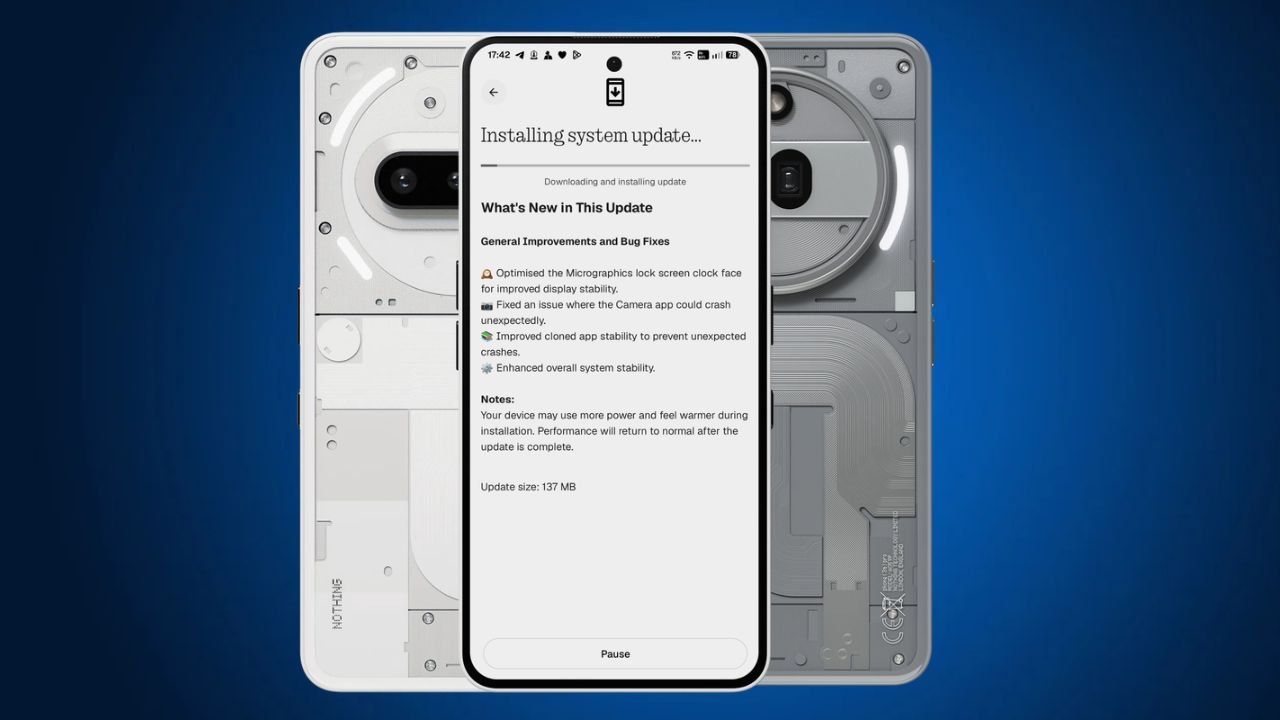
Nothing has started rolling out a new Nothing OS 5.0 Hotfix update for the Nothing Phone (3a) and Nothing Phone (3a) Pro. The latest update focuses on fixing a few issues and improving the overall system stability.
The update is around 137 MB in size and is rolling out to users in phases.
Nothing OS 5.0 Hotfix Update: What’s New?
One of the main changes in this Nothing OS 5.0 hotfix update is related to the Micrographics lock screen clock face. Nothing has optimised it to improve display stability.
Apart from this, the update also brings the following fixes:
- Micrographics Clock: Optimised the Micrographics lock screen clock face for better display stability.
- Camera Fix: Fixed an issue that could cause the Camera app to crash unexpectedly.
- Cloned Apps: Improved stability to prevent cloned apps from crashing unexpectedly.
- System Stability: Improved overall system stability for a smoother experience.
Nothing OS 5.0 Hotfix Update Details
Here are the update details for the Nothing Phone (3a) and Phone (3a) Pro:
| Details | Information |
|---|---|
| Devices | Nothing Phone (3a) and Phone (3a) Pro |
| Software | Nothing OS 5.0 |
| Build Number | C5.0-261106-1007 |
| Update Size | 137 MB |
| Update Type | Hotfix Update |
How to Download the Update?
Nothing Phone (3a) and Phone (3a) Pro users can check for the latest update by following these steps:
- Open Settings on your phone.
- Go to System.
- Select System Update.
- Tap Check for Update.
- Download and install the update if it is available.
The update is rolling out gradually, so it may take some time to reach all users.
Stay updated with latest tech news
Follow TechiBoy on Google to get updates on smartphones, gadgets, software updates, and more.
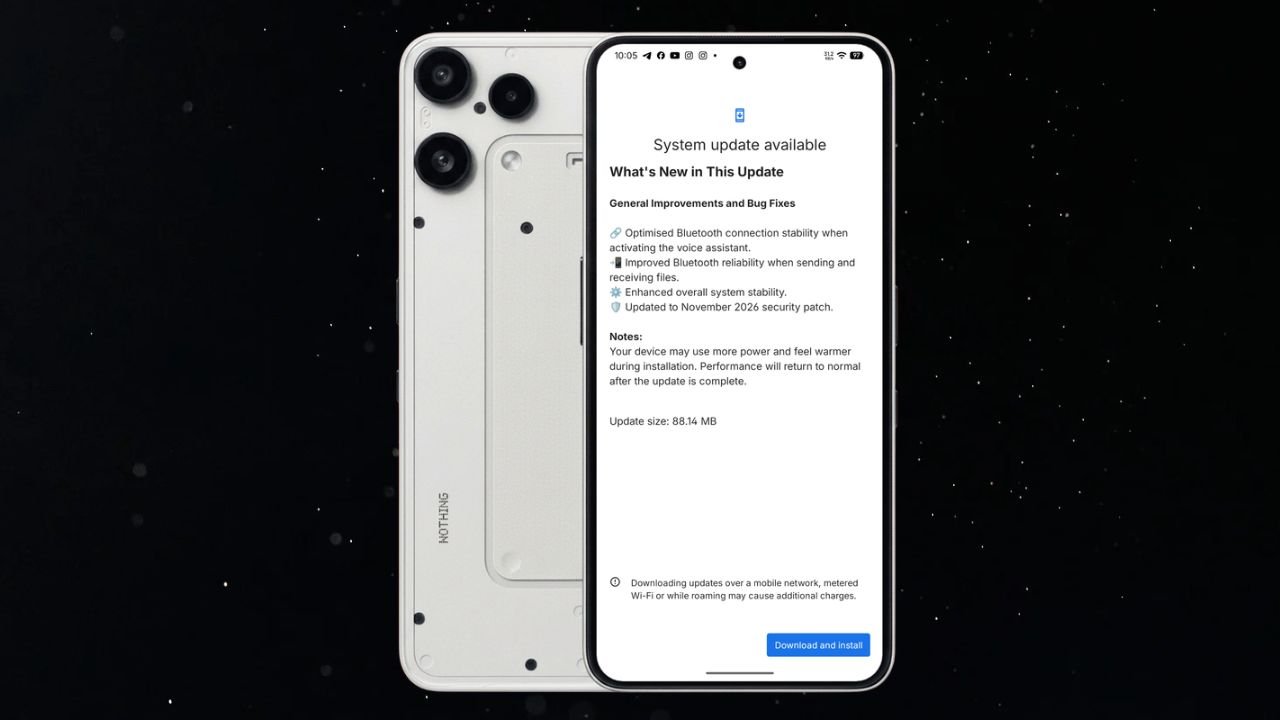
Nothing has started rolling out a new Nothing OS 4.1 November update for the Nothing Phone (3a) Lite. The latest update brings Bluetooth improvements, better system stability, and the November 2026 security patch.
The update is relatively small, with a download size of 88.14 MB. It mainly focuses on improving the overall user experience rather than introducing new features.
Nothing Phone (3a) Lite Nothing OS 4.1 November Update Details
The latest update comes with build number Nothing OS B4.1-261029-1756 for Phone (3a) Lite. It includes several improvements related to Bluetooth connectivity and general system performance.
Here are the update details:
- Device: Nothing Phone (3a) Lite
- Software Version: Nothing OS 4.1
- Build Number: B4.1-261029-1756
- Update Size: 88.14 MB
- Security Patch: November 2026
What’s New in the November Update?
According to the changelog, the update brings the following changes:
1. Improved Bluetooth Stability
Nothing has optimised Bluetooth connection stability when activating the voice assistant. This should make the Bluetooth connection more reliable when using a connected device to access the voice assistant.
2. Better Bluetooth File Sharing
The update also improves Bluetooth reliability when sending and receiving files. This should help provide a more stable experience during Bluetooth file transfers.
3. Enhanced System Stability
Nothing has made improvements to overall system stability. These changes aim to make the phone’s software experience more reliable.
4. November 2026 Security Patch
The update also includes the November 2026 Android security patch to keep the device up to date with the latest security improvements.
How to Download the Update?
Nothing Phone (3a) Lite users can check for the latest update by following these steps:
- Open Settings on your phone.
- Go to System.
- Select System Update.
- Check for the latest available update.
- Download and install latest Nothing OS 4.1.
If the update is not available on your device yet, you can check again later.
Stay updated with latest tech news
Follow TechiBoy on Google to get updates on smartphones, gadgets, software updates, and more.
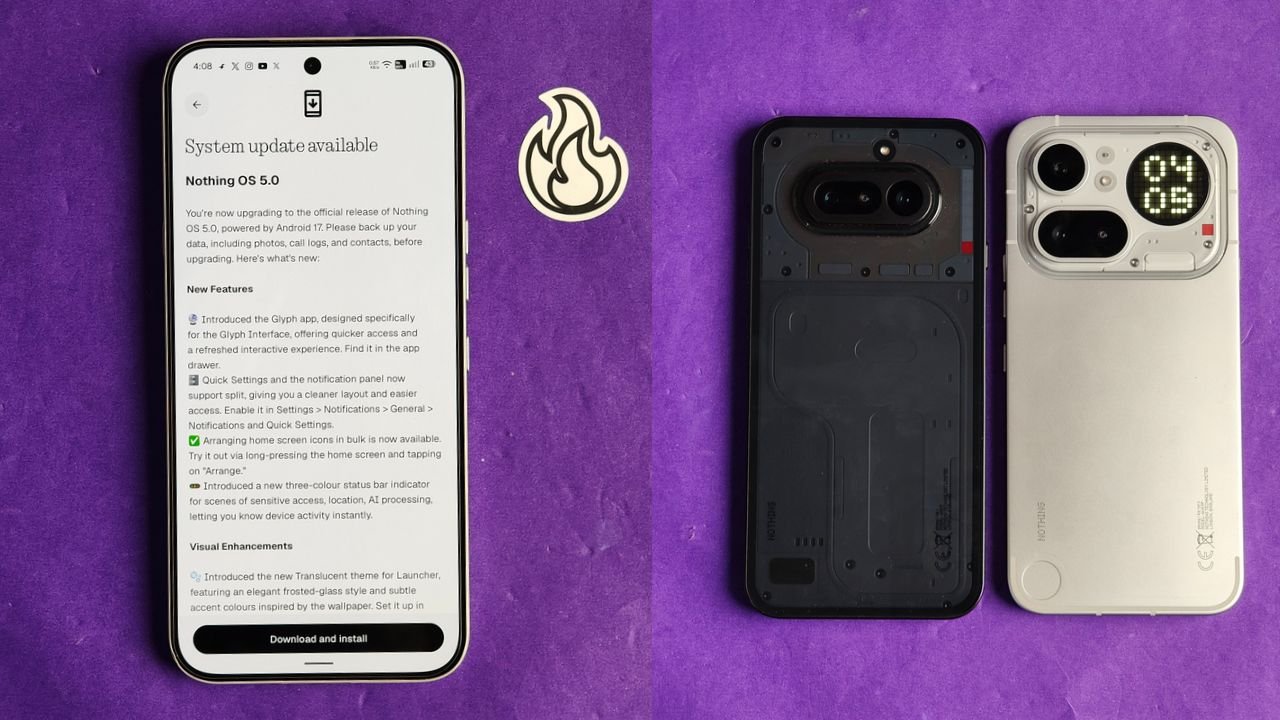
Nothing has started rolling out the stable Nothing OS 5.0 update for the Nothing Phone (4a) and Nothing Phone (4a) Pro. The new update is based on Android 17 and brings several new features, visual changes, camera improvements and other system enhancements.
The stable rollout has started ahead of Nothing’s previously announced early November schedule. However, the update is being released in stages, so it may take some time to reach all users.
Nothing OS 5.0 Update Size
The update is around 1.70 GB in size for beta users, and for non-beta users it is around 3 GB. Users can check for the latest update by going to Settings > System > System update.
What’s New in Nothing OS 5.0?
Nothing OS 5.0 brings quite a few changes to the overall user experience. Here are some of the important additions.
New Glyph App and Split Notifications
Nothing has introduced a dedicated Glyph app that makes it easier to access and manage Glyph Interface features.
The notification panel and Quick Settings can now be separated, giving users more control over how they access notifications and system shortcuts.
There is also a new three-colour status bar indicator that helps users identify sensitive activities such as location access and AI processing.
New Translucent Theme
One of the biggest visual changes is the new Translucent theme for the launcher.

It brings a frosted-glass look with subtle accent colours inspired by your wallpaper. You can enable it by going to Customisation > Theme & Style > Translucent.
Nothing has also added two new lock screen clock faces and the option to customise the clock colour.
New Widgets
The update introduces new widgets, including:
- Collector: Turns your photos into different decorative styles for your home screen.
- Away Time: Tracks how much time you spend away from your phone.
- Glyph Timer: Lets you access the Glyph Timer directly from the widget drawer.
Users can also arrange multiple home screen icons together instead of moving them one by one.
Camera Improvements
Nothing OS 5.0 brings several camera improvements to the Phone (4a) series.
The biggest addition is Dual-view Video, which allows users to record videos using the front and rear cameras simultaneously.
Nothing has also improved video recording, zoom, close-up photography, QR scanning, Google Lens and Motion Photo playback. The camera interface, controls and animations have also been refreshed.
Other Improvements
Apart from these changes, the update includes several smaller improvements:
- Expanded Dark Theme for more apps.
- Enhanced HDR brightness controls.
- Improved Depth wallpapers with pinch-to-resize support.
- Better Live Updates experience.
- Noto 3D Emoji support in Gboard.
- Faster Essential Voice transcriptions.
- Improved lock screen shortcuts.
- One-tap Bluetooth connection and disconnection.
- Refined system animations and a refreshed Settings interface.
How to Download Nothing OS 5.0
If you own a Nothing Phone (4a) or Phone (4a) Pro, follow these steps to check for the update:
- Open Settings on your phone.
- Go to System.
- Tap System update.
- Select Check for updates.
If the update is not available yet, don’t worry. Nothing is following a staged rollout, and it should reach more devices over the coming days.
Before installing, make sure to back up your important data and keep enough battery charge.
Stay updated with latest tech news
Follow TechiBoy on Google to get updates on smartphones, gadgets, software updates, and more.