
News
Nothing OS 4.0 Android 16 Closed Beta Announced for Phone (3) Users


Nothing has officially announced the Closed Beta program for its upcoming operating system update — Nothing OS 4.0, based on Android 16. This early build is now available exclusively for Phone (3) users who want to test the latest features before the official rollout. The company is offering this early access as a way to thank its early supporters.
In this Closed Beta, Nothing is focusing on bringing Android 16’s core features along with a stronger and more consistent design system. The new UI changes are expected to lay the foundation for a more polished and cohesive user experience in the future versions of Nothing OS.
Since this is a beta version, users can expect bugs and certain features not working properly. Nothing encourages users to join this program and help them identify and fix issues before the Open Beta release in September 2025. It’s a chance for users to be part of the development process and shape the final software.
To be eligible, participants must use the Phone (3) as their daily device. They should also be willing to provide regular feedback to the Nothing team, maintain information security, and understand that this early build may be unstable. Testing is expected to run from August 2025 to early September.
Nothing also warns users that this Android 16 build is in its early stages of development. Some features may be missing or not function properly. It is strongly recommended to back up your device regularly while testing. More details and disclaimers can be found in the sign-up form.
If you’re interested in joining, you need to fill out the form linked below before 5 PM BST on Sunday, August 3, 2025. Selected users will be informed via email within a week, along with complete onboarding instructions.
Phone (3) Android 16 Closed Beta Sign-Up Form
Stay updated with latest tech news
Follow TechiBoy on Google to get updates on smartphones, gadgets, software updates, and more.





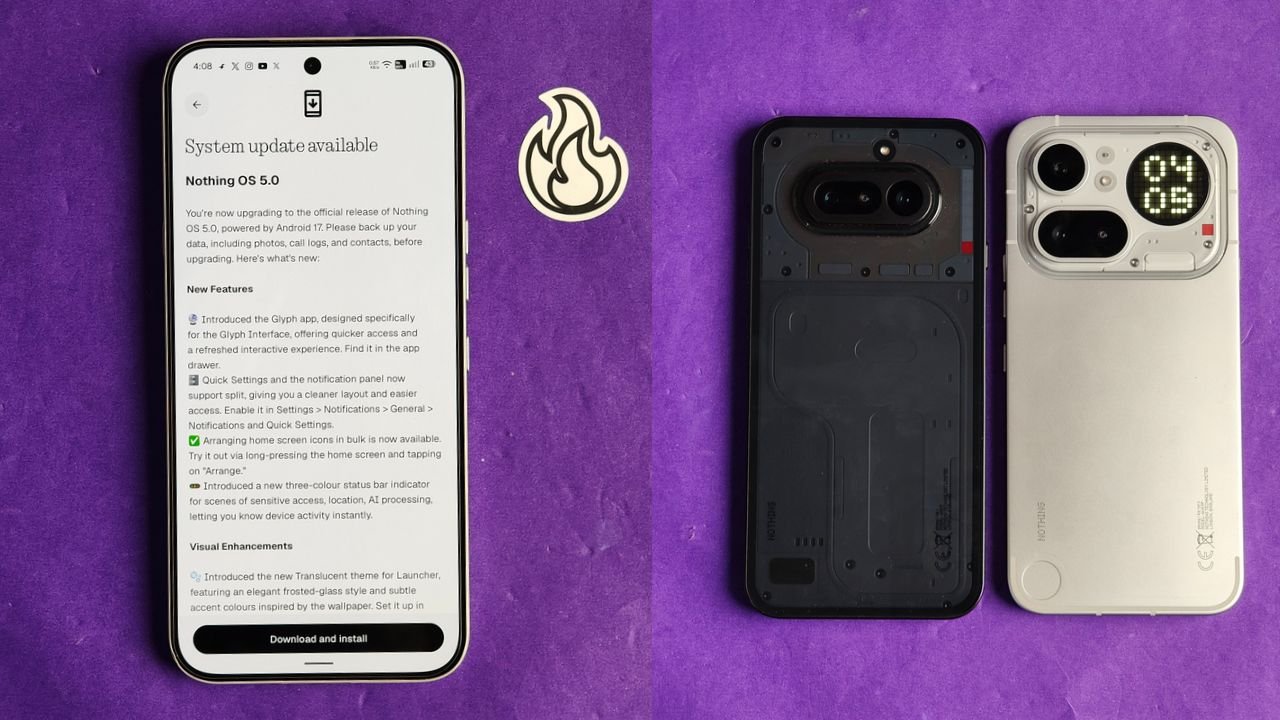
Nothing has started rolling out the stable Nothing OS 5.0 update for the Nothing Phone (4a) and Nothing Phone (4a) Pro. The new update is based on Android 17 and brings several new features, visual changes, camera improvements and other system enhancements.
The stable rollout has started ahead of Nothing’s previously announced early November schedule. However, the update is being released in stages, so it may take some time to reach all users.
Nothing OS 5.0 Update Size
The update is around 1.70 GB in size for beta users, and for non-beta users it is around 3 GB. Users can check for the latest update by going to Settings > System > System update.
What’s New in Nothing OS 5.0?
Nothing OS 5.0 brings quite a few changes to the overall user experience. Here are some of the important additions.
New Glyph App and Split Notifications
Nothing has introduced a dedicated Glyph app that makes it easier to access and manage Glyph Interface features.
The notification panel and Quick Settings can now be separated, giving users more control over how they access notifications and system shortcuts.
There is also a new three-colour status bar indicator that helps users identify sensitive activities such as location access and AI processing.
New Translucent Theme
One of the biggest visual changes is the new Translucent theme for the launcher.

It brings a frosted-glass look with subtle accent colours inspired by your wallpaper. You can enable it by going to Customisation > Theme & Style > Translucent.
Nothing has also added two new lock screen clock faces and the option to customise the clock colour.
New Widgets
The update introduces new widgets, including:
- Collector: Turns your photos into different decorative styles for your home screen.
- Away Time: Tracks how much time you spend away from your phone.
- Glyph Timer: Lets you access the Glyph Timer directly from the widget drawer.
Users can also arrange multiple home screen icons together instead of moving them one by one.
Camera Improvements
Nothing OS 5.0 brings several camera improvements to the Phone (4a) series.
The biggest addition is Dual-view Video, which allows users to record videos using the front and rear cameras simultaneously.
Nothing has also improved video recording, zoom, close-up photography, QR scanning, Google Lens and Motion Photo playback. The camera interface, controls and animations have also been refreshed.
Other Improvements
Apart from these changes, the update includes several smaller improvements:
- Expanded Dark Theme for more apps.
- Enhanced HDR brightness controls.
- Improved Depth wallpapers with pinch-to-resize support.
- Better Live Updates experience.
- Noto 3D Emoji support in Gboard.
- Faster Essential Voice transcriptions.
- Improved lock screen shortcuts.
- One-tap Bluetooth connection and disconnection.
- Refined system animations and a refreshed Settings interface.
How to Download Nothing OS 5.0
If you own a Nothing Phone (4a) or Phone (4a) Pro, follow these steps to check for the update:
- Open Settings on your phone.
- Go to System.
- Tap System update.
- Select Check for updates.
If the update is not available yet, don’t worry. Nothing is following a staged rollout, and it should reach more devices over the coming days.
Before installing, make sure to back up your important data and keep enough battery charge.
Stay updated with latest tech news
Follow TechiBoy on Google to get updates on smartphones, gadgets, software updates, and more.
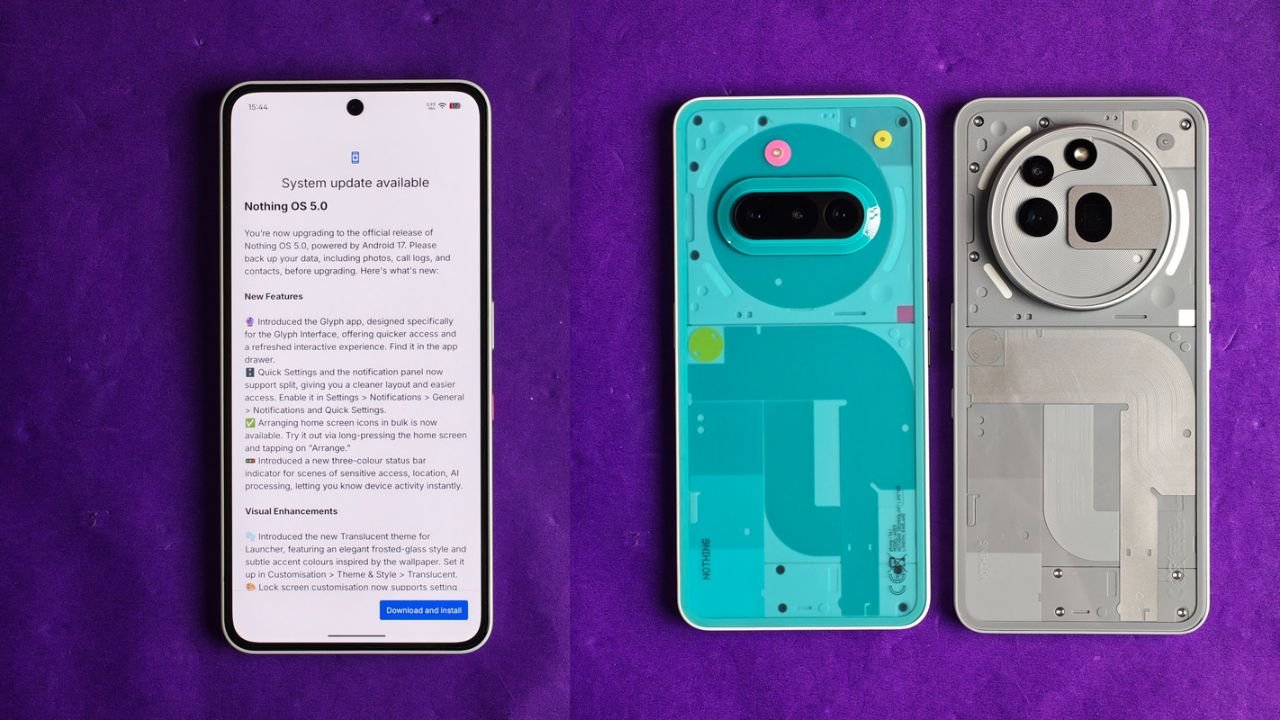
Nothing has started rolling out the Nothing OS 5.0 Stable Update based on Android 17 for the Nothing Phone (3a) and Nothing Phone (3a) Pro. The update brings several new features, UI changes, camera improvements and customisation options to both smartphones.
The new update is around 3.09GB in size and introduces a fresh Translucent Theme, redesigned Quick Settings, new widgets, lock screen customisation and more.
Nothing OS 5.0 Stable Update: What’s New?
One of the biggest changes is the new Translucent Theme. It brings a frosted-glass look to the home screen, with subtle colours that match the selected wallpaper. Users can enable it by going to Customisation > Theme & Style > Translucent.
Nothing has also introduced a new Glyph app, which provides quicker access to Glyph Interface settings. The Quick Settings and Notification Panel can now be separated, giving users a cleaner layout.
Here are some of the major changes included in the update:
1. New Features and UI Changes
- New Glyph App: A dedicated app for accessing Glyph Interface features.
- Separate Quick Settings: Users can now separate Quick Settings and Notifications.
- Bulk App Arrangement: Arrange multiple home screen icons together.
- New Status Bar Indicators: Three-colour indicators show sensitive access, location and AI processing activity.
- Translucent Theme: A new frosted-glass style for the launcher.
- New Clock Faces: Two new lock screen clock styles.
- Lock Screen Customisation: Users can now change the colour of the clock face.
- New Geist Typeface: Updated typography across the system.
2. New Widgets
Nothing OS 5.0 also brings some new widgets to the home screen.
- Collector Widget: Turn favourite photos into decorative home screen elements.
- Away Time Widget: Track how much time you spend away from your phone.
- Glyph Timer Widget: Start and access timers directly from the home screen.
3. Camera Improvements
The camera app has received several improvements with this update.
- Seven adjustable camera tuning effects with a reset option.
- Improved camera presets with easier editing.
- New 2×2 camera preset widget.
- Support for Filters and Tuning in video recording.
- Dual-view Video support.
- Improved zoom and close-up photography.
- Better QR scanning and Google Lens integration.
- Improved Motion Photo playback.
- Refreshed camera interface, controls and animations.
4. Other Improvements
Apart from the major features, Nothing has also added several useful improvements.
- Expanded Dark Theme support for more third-party apps.
- Enhanced HDR Brightness control.
- Depth Wallpapers now support pinch-to-shrink.
- Improved Live Updates experience.
- Noto 3D Emoji support in Gboard.
- Improved lock screen shortcuts.
- Bluetooth devices can now be connected or disconnected with a single tap from Quick Settings.
- Improved system animations and transitions.
Nothing OS 5.0 Update Size and Availability
The update size for this one is 3.09 GB, and the build number is Nothing OS C5.0-261023-2146.
The update is rolling out in phases, which means it may not be available to everyone at the same time. If you haven’t received it yet, you can check for it manually by going to Settings > System > System Update.
Nothing recommends backing up important data before installing the update.
Stay updated with latest tech news
Follow TechiBoy on Google to get updates on smartphones, gadgets, software updates, and more.
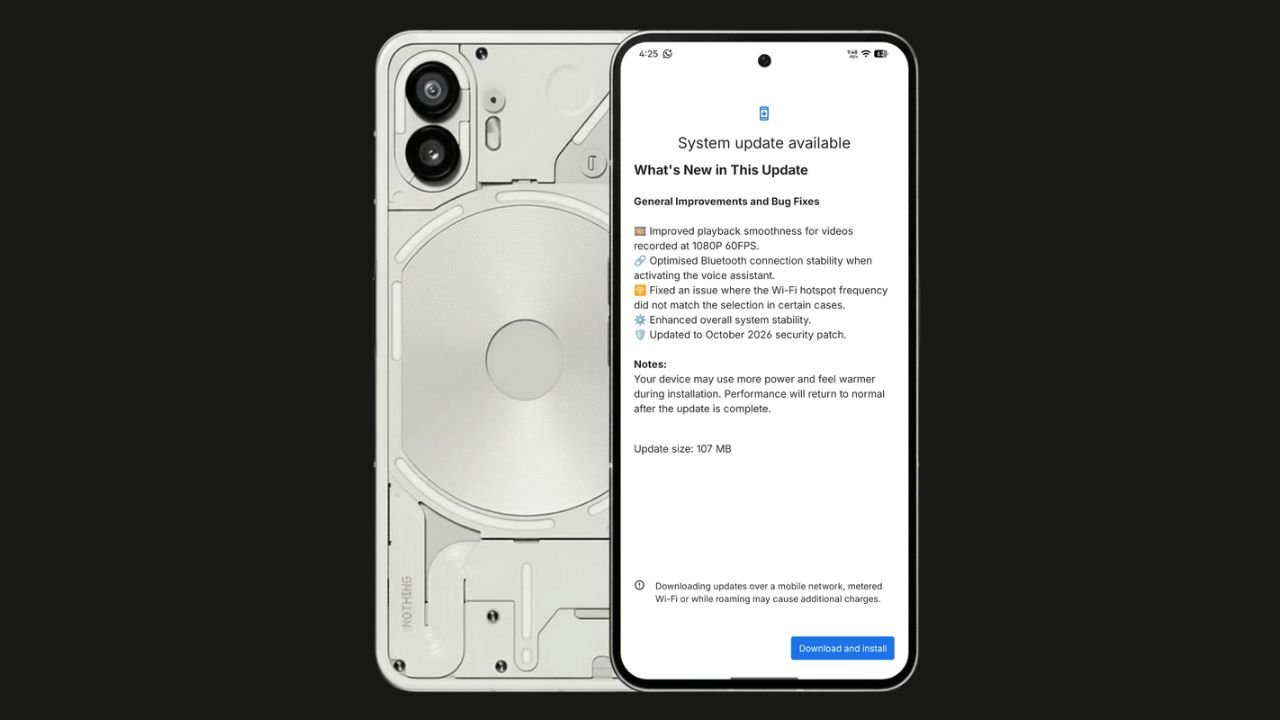
Nothing has started rolling out the Nothing OS 4.1 October 2026 update for the Nothing Phone (2). The update focuses on bug fixes, system stability improvements, and connectivity optimisations. It also brings the October 2026 security patch.
The update size is 107 MB, making it a relatively small maintenance update.
Nothing OS 4.1 October Update: What’s New?
According to the official changelog displayed on the device, the update includes the following improvements:
- Video playback: Improved smoothness for videos recorded at 1080p@ 60FPS.
- Bluetooth: Optimised connection stability when activating the voice assistant.
- Wi-Fi hotspot: Fixed an issue where the hotspot frequency did not match the selected option in certain cases.
- System stability: Enhanced overall system stability.
- Security: Updated to the October 2026 security patch.
How to Download the Update
Nothing Phone (2) users can check for the latest update by navigating to Settings > System > System Update. If the update is available, download and install it.
The rollout may happen in phases, so some users might have to wait before receiving the update.
If you don’t receive any OTA related to the update, you can manually update through our Nothing Firmware app.
Overall, the Nothing OS 4.1 October update is a minor maintenance release focused on improving the everyday user experience rather than introducing new features.
Stay updated with latest tech news
Follow TechiBoy on Google to get updates on smartphones, gadgets, software updates, and more.