
Nothing OS
Nothing OS 5.0 Translucent Theme: Supported Devices, Features, Rollout Details and What Needs Improvement

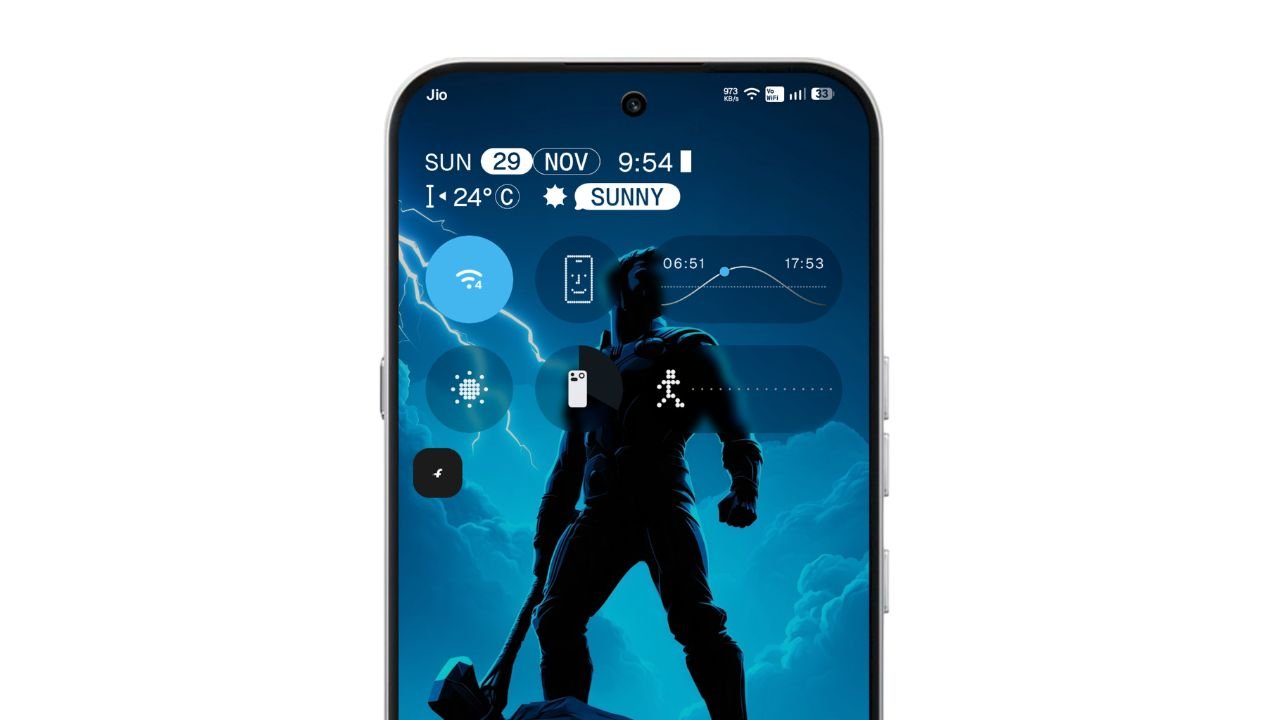
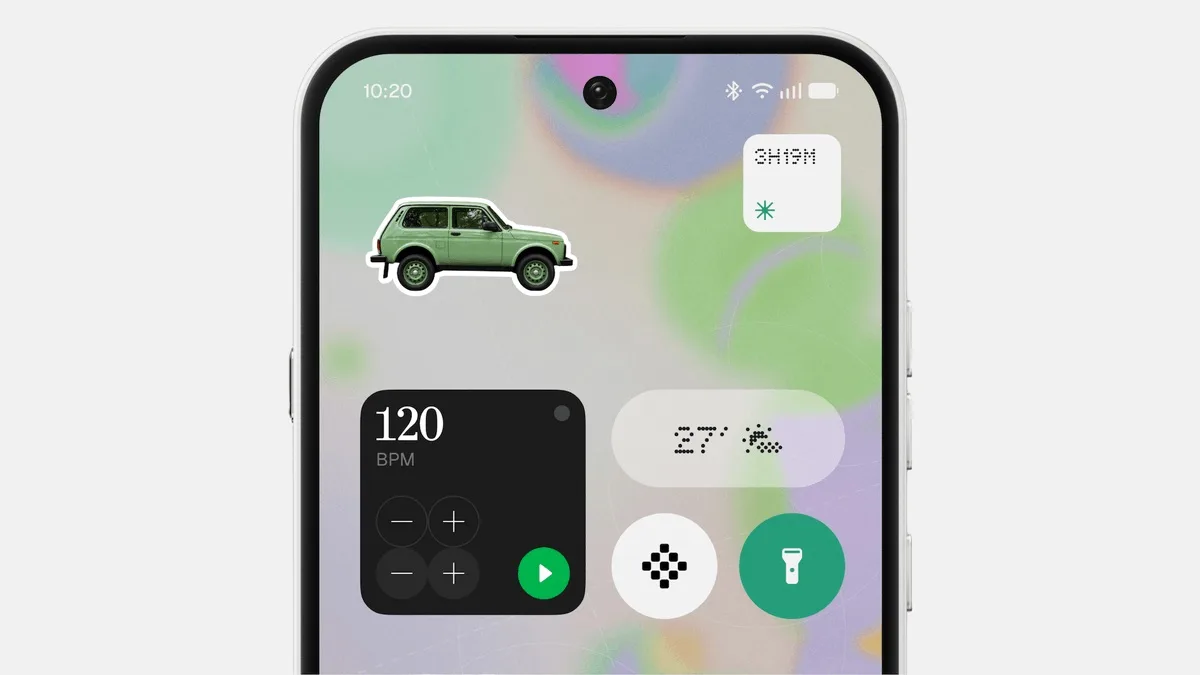
Nothing OS 5.0 introduced several visual changes, but one of its most noticeable additions is the new Translucent Theme. The redesigned interface brings transparent elements, adaptive colours and a fresh visual experience to the home screen, making the software feel more layered and connected to the wallpaper.
However, the rollout has been different across Nothing smartphones. While some devices received the feature with the stable update, others initially missed it in the Open Beta. Here’s everything you need to know about the Nothing OS 5.0 Translucent Theme, including its features, supported devices and rollout status.

What is the Nothing OS 5.0 Translucent Theme?
The Translucent Theme introduces transparent details across widgets and Search to add depth and layering to the interface. The same material design language also extends to first-party experiences, including Nothing Gallery.

Unlike the traditional Nothing OS interface, the new theme focuses on transparency and wallpaper-based colours. It makes different home screen elements feel more connected instead of appearing as separate components.
The redesigned home screen is available as an additional theme alongside the existing Nothing OS style. This means users can choose between the original Nothing OS appearance and the new Translucent Theme.
Nothing OS 5.0 Translucent Theme Features

Looking at the screenshots above, I feel the Translucent Theme looks better in Dark Mode, especially when the wallpaper has objects that complement the background blur. In Light Mode, it has more of a whitish, glass-like finish.
1. Transparent Widgets and Search
One of the biggest changes is the introduction of transparent details across widgets and Search.
These elements use transparency to create a sense of depth and layering. Instead of using the usual solid backgrounds, the new design allows more of the wallpaper to remain visible.

The same visual language is also extended to selected first-party Nothing experiences, including Gallery.
2. Wallpaper-Based Accent Colours
The Translucent Theme also introduces three accent colour options.
These colours are derived from the selected wallpaper, allowing users to customise the appearance of their home screen. When you change your wallpaper, the corresponding visual elements and colours update to match the new background.
App icons also receive subtle colour tints based on the wallpaper, helping maintain a more consistent appearance across the home screen and lock screen.
3. Adaptive Colours Across Widgets
The accent colour isn’t simply applied to the entire widget. Instead, it adapts to the relevant elements or positions within individual widgets.

For example, Weather and Clock widgets use accent colours across their respective visual elements. This gives the widgets a more dynamic appearance while retaining their original functionality.
4. Quick Settings Widgets Get Prominent Colours
The 1×1 Quick Settings widgets use more prominent colours derived from the selected wallpaper.

For example, when Wi-Fi is enabled, the corresponding Quick Settings widget displays the selected accent colour more prominently. This makes active controls easier to distinguish while following the overall visual design.
Nothing OS 5.0 Translucent Theme: Supported Devices
Nothing has gradually expanded the Translucent Theme to more devices. Here is the current rollout status.
Devices that have received the Translucent Theme:
- Nothing Phone (2a)
- Nothing Phone (2a) Plus
- Nothing Phone (3a)
- Nothing Phone (3a) Pro
- Nothing Phone (3)
- Nothing Phone (4a)
- Nothing Phone (4a) Pro
Devices still waiting for the Translucent Theme:
- CMF Phone 2 Pro
- Nothing Phone (4b)
Nothing OS 5.0 Translucent Theme: Open Beta vs Stable Update
Interestingly, Nothing didn’t follow the same rollout approach for every smartphone.
Some devices received the Translucent Theme with their stable Nothing OS 5.0 update, while others received it through a separate Open Beta update.
Here’s how the rollout happened across different devices.
Nothing Phone (3) and Phone (4a) Series
The Nothing Phone (3) and Phone (4a) Pro were among the first devices to receive the Nothing OS 5.0 Open Beta. Later, the Phone (4a) received it as well.

However, the initial Open Beta update didn’t include the Translucent Theme. Nothing later introduced the feature with their respective stable Nothing OS 5.0 updates.
Nothing Phone (2a) and Phone (2a) Plus
The rollout was slightly different for the Nothing Phone (2a) and Phone (2a) Plus.

Surprisingly, Nothing initially provided these users with the regular Open Beta experience without the Translucent Theme. Later, the company released a separate beta update that introduced the new theme.
Interestingly, the stable update retained the same implementation without major changes to the Translucent Theme.
Nothing Phone (3a) and Phone (3a) Pro
The Nothing Phone (3a) and Phone (3a) Pro also missed the Translucent Theme in their initial Open Beta releases.
However, Nothing eventually included the feature with their stable Nothing OS 5.0 updates for Phone (3a) series.
Overall, the rollout strategy was different across the lineup, with some devices receiving the feature in beta and others having to wait for the stable release.
One Major Issue: Nothing Icon Pack Doesn’t Support the Translucent Theme
While the Translucent Theme brings a fresh visual experience, there’s still one noticeable issue that Nothing needs to address.

The existing Nothing icon pack doesn’t properly support the new translucent design. As a result, the home screen can look inconsistent, with transparent widgets and other redesigned elements sitting alongside app icons that don’t follow the same visual language.
This takes away some of the visual consistency that the new theme is trying to achieve.
Hopefully, Nothing will introduce proper translucent icon pack support in a future Nothing OS update.
We would like to see this improvement arrive with Nothing OS 5.1, potentially alongside the upcoming Nothing Phone (5a) series next year. If Nothing doesn’t bring proper support, my team and I are trying to create a glass-style icon pack that complements the Translucent Theme.

I might launch it in the first week of December, or a little later, depending on Google Play’s approval process.
Stay updated with latest tech news
Follow TechiBoy on Google to get updates on smartphones, gadgets, software updates, and more.





Nothing OS
Nothing OS 5.0 Update Tracker: These Devices Have Received the Update, Check Which Are Still Waiting
Nothing has started rolling out its latest Nothing OS 5.0 update, based on Android 17, to its eligible smartphones. The new update brings several changes to the user interface, customization options, performance, and overall user experience.
The stable rollout started with the Nothing Phone (3) on October 12, 2026. Since then, the company has expanded the update to more Nothing and CMF smartphones.
As of November 28, 2026, seven smartphones have received the Nothing OS 5.0 stable update. However, some eligible devices are still waiting for their turn.
Let’s take a look at the complete Nothing OS 5.0 update status.
Nothing OS 5.0: Devices That Have Received the Update
Here is the list of Nothing smartphones that have received the Nothing OS 5.0 stable update:
| Device | Update Status |
|---|---|
| Nothing Phone (3) | Rolled Out |
| Nothing Phone (4a) Pro | Rolled Out |
| Nothing Phone (4a) | Rolled Out |
| Nothing Phone (3a) Pro | Rolled Out |
| Nothing Phone (3a) | Rolled Out |
| Nothing Phone (2a) Plus | Rolled Out |
| Nothing Phone (2a) | Rolled Out |
The Nothing Phone (3) was the first device to receive the stable Nothing OS 5.0 update on October 12.
Later, on October 30, Nothing expanded the stable rollout to the Phone (4a), Phone (4a) Pro, Phone (3a), and Phone (3a) Pro.
Most recently, the Nothing Phone (2a) and Phone (2a) Plus received the stable update on November 19, 2026.
Nothing OS 5.0: Devices Still Waiting for the Update
Nothing has also shared the rollout timeline for its remaining eligible devices. Here are the smartphones that are still waiting for the stable update.
| Device | Expected Rollout |
|---|---|
| Nothing Phone (3a) Lite | Late December 2026 |
| Nothing Phone (4b) | Mid-January 2027 |
| CMF Phone 2 Pro | Mid-January 2027 |
According to the rollout schedule, the Nothing Phone (3a) Lite is expected to receive the stable update in late December.

Meanwhile, the Nothing Phone (4b) and CMF Phone 2 Pro are scheduled to receive Nothing OS 5.0 in mid-January 2027. However, the Nothing Phone (4b) is expected to receive the Nothing OS 5.0 Open Beta update in mid-December 2026.
These timelines are expected rollout windows and may change.
Nothing Phones That Will Not Receive Nothing OS 5.0
Unfortunately, not every Nothing smartphone is eligible for the latest update.
The following devices will not receive Nothing OS 5.0:
- Nothing Phone (1)
- Nothing Phone (2)
- CMF Phone 1
These smartphones have reached the end of their major Android version update support. However, this does not necessarily mean that security updates and smaller software improvements will stop immediately.
What’s New in Nothing OS 5.0?
Nothing OS 5.0 is based on Android 17 and brings several improvements to the software experience.
Some of the major highlights include:
- Refreshed user interface with a new translucent theme design.
- Separate Notification and Quick Settings panels.
- New system animations.
- Updated widgets and Glyph features.
- New clock styles and transparent widgets.
- Improved Essential Space features.
- Camera improvements and Dual-view video for some devices.
- Performance improvements and Android 17 features.
The update also introduces additional personalization options and visual changes to give Nothing smartphones a refreshed look.
How to Check for Nothing OS 5.0 Update
If your smartphone is eligible, you can manually check for the update by following these steps:
- Open Settings on your Nothing Phone.
- Go to System.
- Select System Update.
- Tap Check for Updates.
If the update is available for your device, you can download and install it.
Stay updated with latest tech news
Follow TechiBoy on Google to get updates on smartphones, gadgets, software updates, and more.
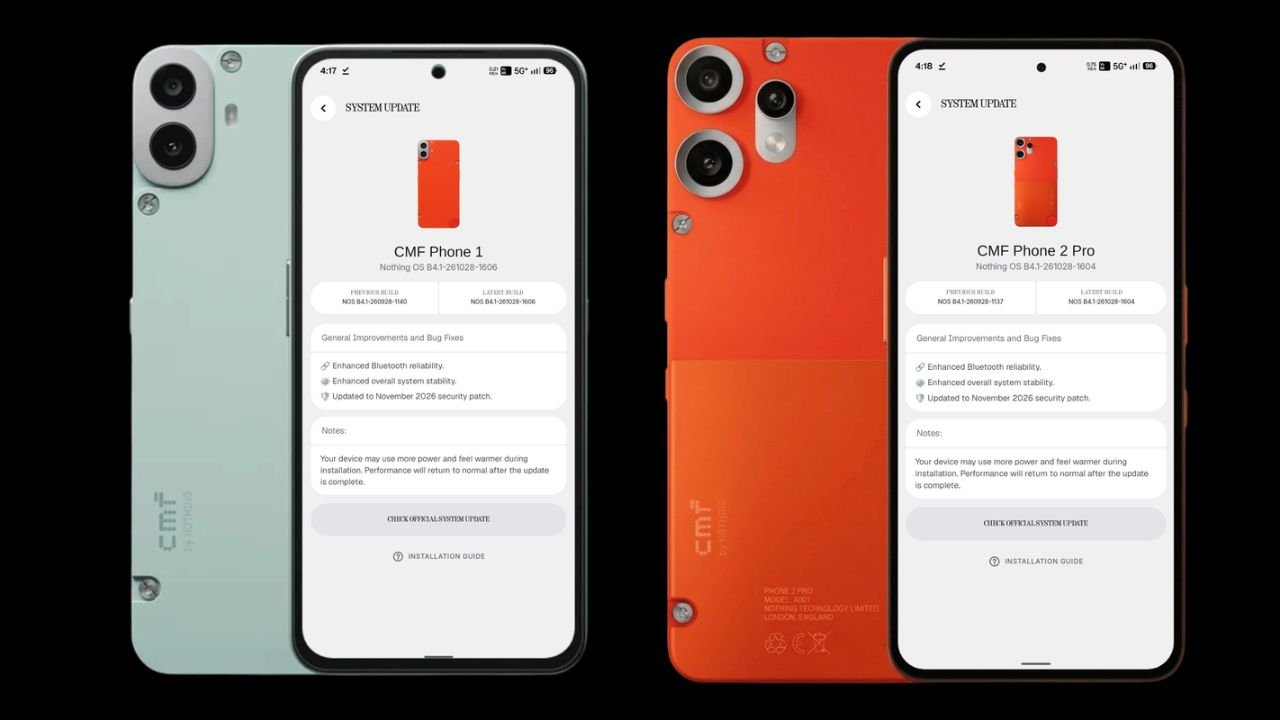
Nothing has started rolling out the Nothing OS 4.1 November 2026 update for the CMF Phone 1 and CMF Phone 2 Pro. The latest update focuses on improving Bluetooth reliability, overall system stability, and bringing the November 2026 security patch.
The update is available with different build numbers and sizes for both smartphones.
Nothing OS 4.1 November Update: Build Numbers and Sizes
- CMF Phone 1: B4.1-261028-1606 (57.29 MB)
- CMF Phone 2 Pro: B4.1-261028-1604 (68.77 MB)

What’s New in the Update?
According to the changelog, the Nothing OS 4.1 November update brings the following changes:
- Enhanced Bluetooth reliability: Improves Bluetooth connectivity and reliability.
- Improved system stability: Enhances overall system stability for a better experience.
- November 2026 Security Patch: Updates the Android security patch to November 2026.
Apart from these changes, Nothing has not mentioned any major new features in this update.
How to Download the Update
CMF Phone 1 and CMF Phone 2 Pro users can check for the latest update by going to Settings > System > System Update.
As usual, the update may roll out in batches, so it might take some time to reach all users.
Stay updated with latest tech news
Follow TechiBoy on Google to get updates on smartphones, gadgets, software updates, and more.
Nothing OS
Nothing Phone (2a) and Phone (2a) Plus Get Nothing OS 5.0 Stable Update Based on Android 17
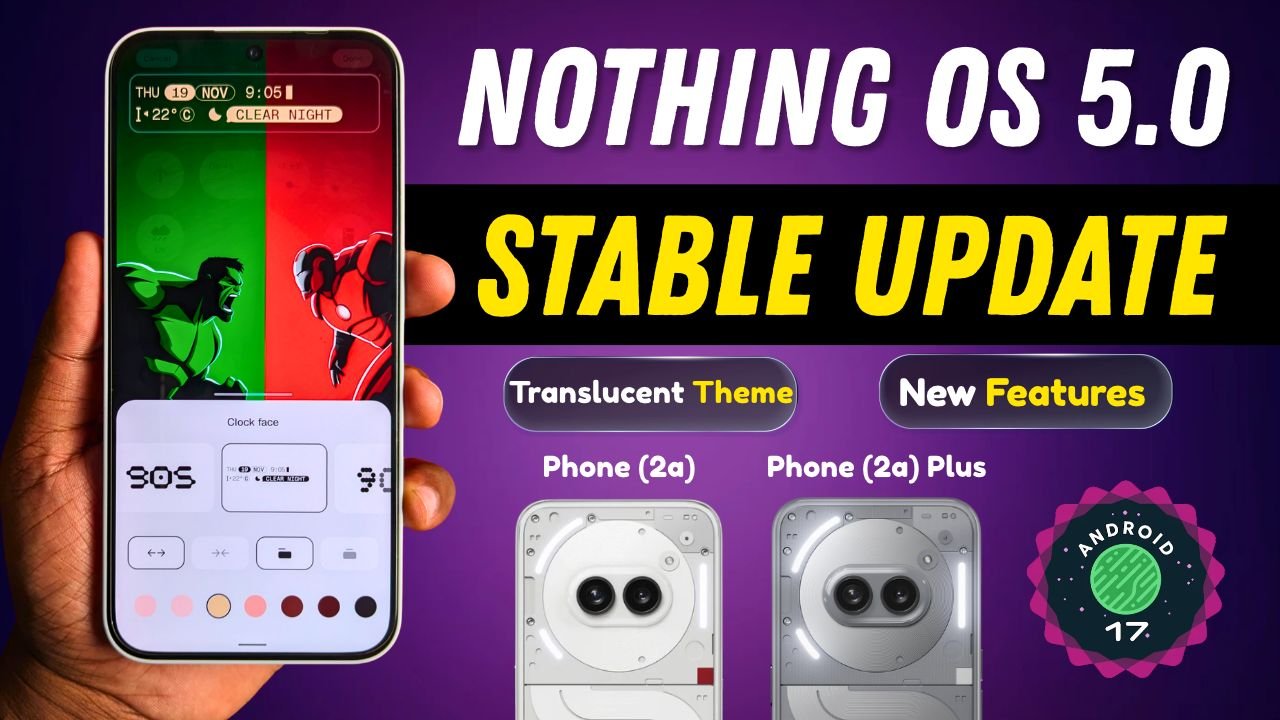
Nothing has started rolling out the Nothing OS 5.0 Stable update, based on Android 17, for the Nothing Phone (2a) and Nothing Phone (2a) Plus. The new update brings several new features, visual changes, camera improvements, new widgets, and bug fixes.
The update is now rolling out to users who were previously using the Nothing OS 5.0 Open Beta.
Nothing OS 5.0 Update Size
According to the update details, the update size is different for beta and non-beta users.
- Beta users: 361 MB
- Non-beta users: 3.15 GB
Build number: Nothing OS C5.0-261112-193
What’s New in Nothing OS 5.0 Stable Update?
The Nothing OS 5.0 update brings several new features and improvements. Here are the major changes. By the way these changes were all present in Nothing OS 5.0 open beta update for Phone (2a) Series.
New Features
Nothing has introduced a new Glyph app, designed specifically for the Glyph Interface. It offers quicker access and a refreshed interactive experience.
The update also brings separate Quick Settings and Notification panels, giving users a cleaner layout and easier access.
Users can now arrange multiple home screen icons in bulk by long-pressing the home screen and selecting the Arrange option.
There is also a new three-colour status bar indicator for sensitive activities such as location access and AI processing. This helps users know when certain device activities are taking place.
Visual Changes
Nothing OS 5.0 introduces a new Translucent theme for the Launcher. It features a frosted-glass design with subtle accent colours inspired by the wallpaper.
Other visual improvements include:
- Lock screen customisation now supports setting a colour for the clock face.
- Two new lock screen clock faces.
- Updated wallpaper gallery with a new wallpaper style.
- New Geist typeface and redesigned Settings UI.
- Improved status bar icons and animations.
- Smoother interactions and transition animations.
New Widgets
Nothing has also added new widgets to improve the home screen experience.
- Collector Widgets: Allows users to turn their photos into different-style decorations on the home screen.
- Away Time Widgets: Helps users track their time away from the screen.
- Glyph Timer: Now supported in the widget drawer.
Widget Blur Effect Difference Between Devices
There is also a difference in the widget experience across Nothing devices.
On the Nothing Phone (2a) and Phone (2a) Plus, opening widgets such as Glyph Timer, Collector, Away Time, and other widgets does not show a blurred background effect.
However, this blur background effect is available on the Nothing Phone (4a) Pro and Nothing Phone (3).
This means the widget experience is not exactly the same across all Nothing smartphones, even with the Nothing OS 5.0 update.
Camera Improvements
The camera app has received several improvements with this update.
Nothing has introduced Tuning with seven adjustable effects and a reset option. Presets have also been upgraded with easier editing, richer cards, Playground integration, and a new 2×2 widget.
Other camera improvements include:
- Enhanced video creation with Filters and Tuning support.
- H.265 video encoding.
- Improved recording and zoom.
- Better close-up shooting and QR scanning.
- Improved Google Lens and Motion Photo playback.
- Refreshed Camera UI, controls, and animations.
General Improvements and Bug Fixes
The update also brings several system-level improvements.
Expanded Dark Theme is now available, allowing users to apply Dark Theme to more apps that do not support it natively.
There is also a new Enhanced HDR Brightness option that lets users customise HDR intensity for a more comfortable viewing experience.
Other changes include:
- Depth (Beta) wallpapers now support pinch-to-shrink.
- Improved Live Updates with a better status bar experience.
- New Nothing 3D Emoji in Gboard.
- Improved lock screen shortcut interactions.
- Bluetooth devices can now be connected or disconnected with a single tap from Quick Settings.
- Security improvements and fixes for reported issues.
How to Download Nothing OS 5.0 Stable Update?
If you own a Nothing Phone (2a) or Nothing Phone (2a) Plus, you can check for the latest update by following these steps:
- Open Settings on your phone.
- Go to System.
- Tap System Update.
- Check for the Nothing OS 5.0 update.
- Download and install it if available.
The update is rolling out gradually, so it may take some time to reach all users.
Note: Your phone may temporarily heat up and consume more power during the update process. This should return to normal after the installation is complete.
Stay updated with latest tech news
Follow TechiBoy on Google to get updates on smartphones, gadgets, software updates, and more.