
News
CMF Clip Pro Announced as the Brand’s First Open-Ear Earbuds; Offers Hi-Res Audio, LDAC, and Up to 32.5 Hours Battery


CMF by Nothing has officially announced the CMF Clip Pro, the company’s first pair of open-ear wireless earbuds. The new earbuds are designed for users who want to enjoy music while still being aware of their surroundings, making them suitable for commuting, workouts, and everyday use.
The CMF Clip Pro comes with a lightweight design, improved sound quality, smart controls, and long battery life.
Lightweight Open-Ear Design
The CMF Clip Pro features a new 3-point Clip Design, which helps spread pressure evenly across the ear for a more comfortable fit. Each earbud weighs only 5.9 grams, making them light enough for all-day use.

The earbuds also use a flexible titanium wire core that adjusts to different ear shapes. CMF says the design offers a secure fit while remaining comfortable during long listening sessions.
10.8mm Drivers with Hi-Res Audio Support
The earbuds are equipped with 10.8mm dual-magnet dynamic drivers that deliver balanced sound with deep bass, clear vocals, and detailed highs.
To improve bass performance, CMF has included Ultra Bass Technology, which boosts low frequencies while reducing distortion.
The Clip Pro is also Hi-Res Audio Certified and supports LDAC, AAC, and SBC audio codecs for better wireless audio quality on supported devices.
Clear Calls with 4 HD Microphones
For voice calls, the CMF Clip Pro features 4 HD microphones along with VPU-powered Clear Voice Technology. This helps reduce background noise and makes voices clearer during calls.
The earbuds also include a Sound Seal feature that reduces sound leakage, helping keep music and calls more private. Users can adjust this feature through the Nothing X app.
Smart Dial Charging Case
One of the standout features is the Smart Dial built into the charging case. Users can rotate the dial to adjust volume, control music playback, answer calls, and pair devices without taking out their phone.
The earbuds also include physical button controls for easier operation during workouts or while wearing gloves.
Battery Life and Other Features
The CMF Clip Pro offers:
- Up to 10 hours of playback on a single charge
- Up to 32.5 hours of total battery life with the charging case
- 10-minute fast charging gives up to 4 hours of playback
Other features include:
- Bluetooth 5.4
- Dual Device Connection
- Low Latency Mode for gaming
- Google Fast Pair
- Microsoft Swift Pair
- IP54 dust and water resistance
- Nothing X app support for customization and firmware updates
Colors, Price, and Availability
The CMF Clip Pro will be available in Coral, Light Grey, and Dark Grey color options.
Price
- £79 (UK)
- $99 (US)
Availability
- UK, US, and Japan: August 15
- Europe and Rest of the World (ROW): September 15
It appears that the CMF Clip Pro will not be available in India, based on the brand’s official community post.
Stay updated with latest tech news
Follow TechiBoy on Google to get updates on smartphones, gadgets, software updates, and more.





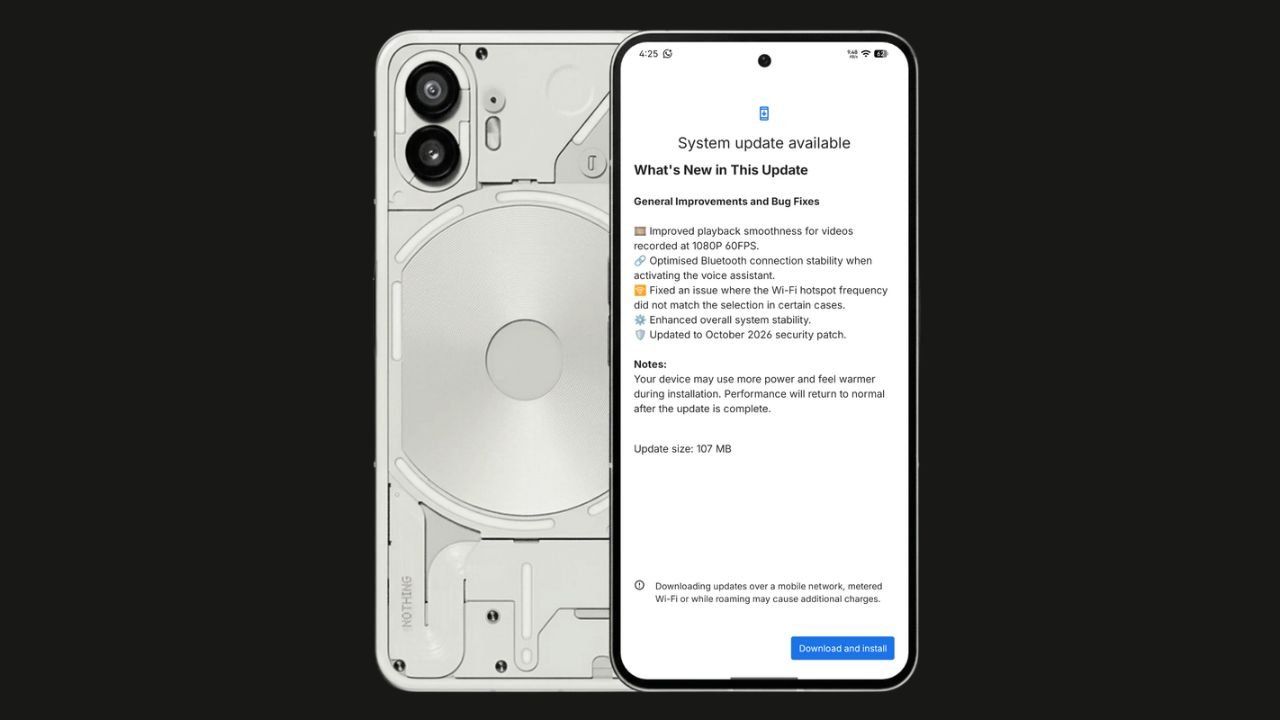
Nothing has started rolling out the Nothing OS 4.1 October 2026 update for the Nothing Phone (2). The update focuses on bug fixes, system stability improvements, and connectivity optimisations. It also brings the October 2026 security patch.
The update size is 107 MB, making it a relatively small maintenance update.
Nothing OS 4.1 October Update: What’s New?
According to the official changelog displayed on the device, the update includes the following improvements:
- Video playback: Improved smoothness for videos recorded at 1080p@ 60FPS.
- Bluetooth: Optimised connection stability when activating the voice assistant.
- Wi-Fi hotspot: Fixed an issue where the hotspot frequency did not match the selected option in certain cases.
- System stability: Enhanced overall system stability.
- Security: Updated to the October 2026 security patch.
How to Download the Update
Nothing Phone (2) users can check for the latest update by navigating to Settings > System > System Update. If the update is available, download and install it.
The rollout may happen in phases, so some users might have to wait before receiving the update.
If you don’t receive any OTA related to the update, you can manually update through our Nothing Firmware app.
Overall, the Nothing OS 4.1 October update is a minor maintenance release focused on improving the everyday user experience rather than introducing new features.
Stay updated with latest tech news
Follow TechiBoy on Google to get updates on smartphones, gadgets, software updates, and more.

Nothing has teased another Pokémon on its official X account and Nothing Community, hinting that a new product could be on the way. This time, the company has shared Kingdra, Pokémon #230 in the National Pokédex.
Kingdra is a Water/Dragon-type Pokémon introduced in Generation II. The teaser features the Pokémon alongside a cryptic description about sleeping deep on the ocean floor to build energy and causing tornadoes when it wakes up.

What Could Nothing Be Launching Next?
Nothing has not revealed which product the new Pokémon teaser refers to. However, the company has previously used Pokémon-themed teasers to build anticipation for upcoming devices, making this latest post worth watching.
An audio product, such as new Nothing Ear earbuds or headphones, could be one possibility. A new smartphone or another product category cannot be ruled out either.
For now, the product name, specifications, pricing and launch date remain unknown. More details may emerge through future teasers from the company.
Stay updated with latest tech news
Follow TechiBoy on Google to get updates on smartphones, gadgets, software updates, and more.
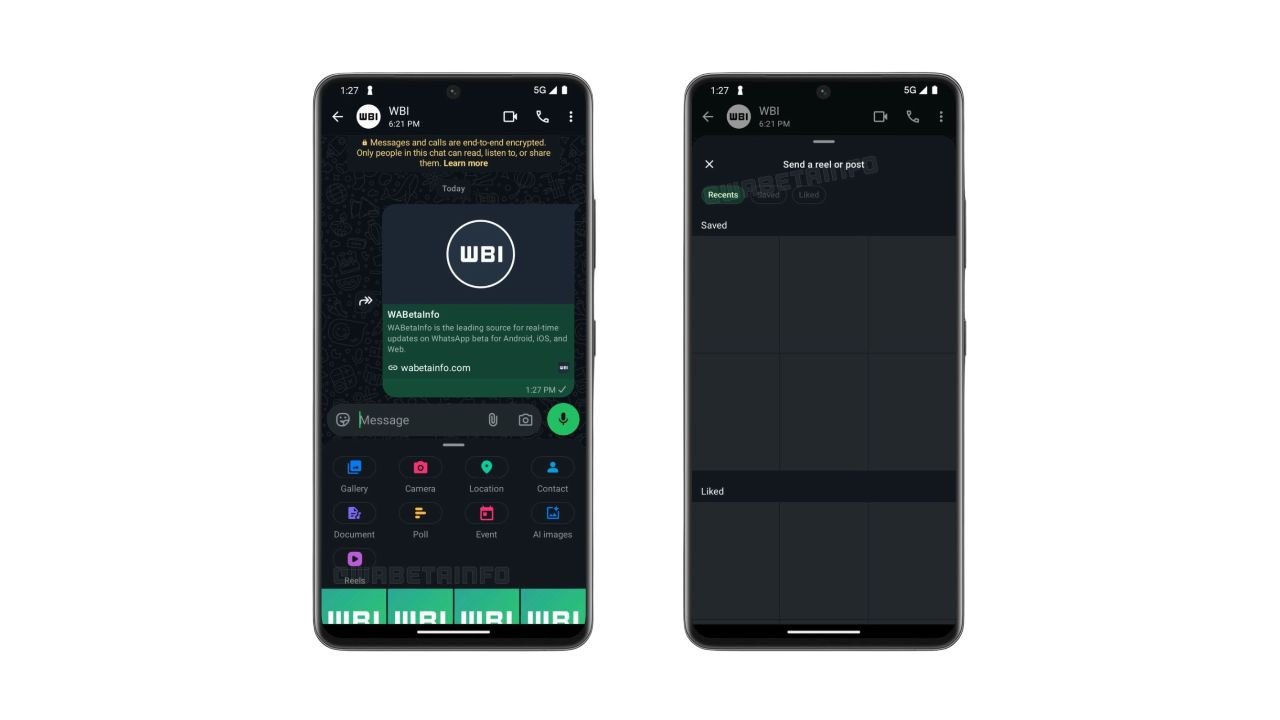
WhatsApp is testing a new shortcut that makes sharing Instagram Reels directly in chats easier. The feature adds a dedicated Reels button to the chat attachment menu, allowing users to quickly find and share Instagram content without navigating through multiple menus.
The feature was spotted in WhatsApp beta for Android version 2.26.42.9 and is currently rolling out to some beta testers.
WhatsApp Adds a Dedicated Reels Button
Previously, users who linked their WhatsApp account to Meta’s Accounts Center could access Instagram Reels through the media picker. However, finding the option required opening the picker and selecting Instagram from the source list.
With the new shortcut, users can tap the Reels button directly from the chat attachment menu to open a dedicated interface for browsing and sharing content.
Recent, Saved and Liked Reels
The new interface includes three tabs:
- Recent: Reels recently watched on Instagram.
- Saved: Reels saved by the user.
- Liked: Reels liked by the user.
Users can browse these sections and select content to share in WhatsApp chats. The interface also reportedly provides access to posts.
Availability
The shortcut requires users to link their WhatsApp account to Meta’s Accounts Center. This integration remains optional, so users who prefer to keep their accounts separate can continue using WhatsApp without connecting them.
The feature is rolling out gradually to Android beta testers through the Google Play Store. WhatsApp has not yet announced when the dedicated Reels shortcut will become available to all users.
Stay updated with latest tech news
Follow TechiBoy on Google to get updates on smartphones, gadgets, software updates, and more.