
News
OnePlus Nord CE5 Launched in India with 6.77-inch AMOLED Display, Dimensity 8350 Apex Chip, and 7100mAh Battery Starting at ₹24,999


OnePlus has officially launched the Nord CE5, the newest addition to its Core Edition (CE) series in India. Unveiled at the company’s latest event, the Nord CE5 brings major hardware upgrades, a large battery, improved cooling system, and extended software support—making it one of the most powerful CE-series smartphones yet.
Display and Design
The OnePlus Nord CE5 features a 6.77-inch Full HD+ AMOLED display with a 120Hz refresh rate, offering smooth scrolling and gameplay. The display supports peak brightness up to 1430 nits, 1300 nits HBM (High Brightness Mode), and 100% DCI-P3 color gamut for vivid visuals. This makes the phone ideal for both indoor and outdoor usage.
The device comes in three color variants: Black Infinity, Marble Mist, and Nexus Blue. It measures 163.58 x 76.02 x 8.17mm (8.27mm for Marble Mist variant) and weighs 199g.
Performance and Cooling
At its core, the Nord CE5 is powered by the MediaTek Dimensity 8350 Apex 4nm processor, with clock speeds up to 3.35GHz, coupled with the Arm Mali-G615 MC6 GPU. It comes in two RAM configurations — 8GB and 12GB LPDDR5X RAM, with storage options of 128GB and 256GB UFS 3.1. The phone also supports up to 12GB virtual RAM expansion, delivering a powerful multitasking experience.
To ensure sustained performance under load, OnePlus has integrated an advanced CryoVelocity VC Cooling system. This system includes a graphene-based composite vapor chamber with a total heat dissipation area of 7,041 mm², making it one of the most efficient in its class.
OnePlus claims that the phone can deliver 120 FPS gameplay in popular titles such as BGMI and Call of Duty: Mobile, making it a suitable option for mobile gamers.
Camera Setup
On the camera front, the Nord CE5 features a 50MP main rear camera equipped with the Sony LYT-600 sensor, featuring optical image stabilization (OIS) and an f/1.8 aperture. It is supported by an 8MP ultra-wide-angle camera with a 112-degree field of view and an f/2.2 aperture.
For selfies and video calls, the phone sports a 16MP front camera with an f/2.4 aperture. The rear camera supports up to 4K video recording at 60fps, while the front camera can record videos at 1080p 60fps.
Battery and Charging
One of the standout features of the Nord CE5 is its massive 7100mAh battery — the largest ever in a OnePlus phone. It supports 80W SuperVOOC fast charging, which can fully charge the phone in just over an hour. The device also supports bypass charging, a feature that powers the phone directly without charging the battery, reducing heat during gaming.

Software and Updates
The Nord CE5 runs on Android 15 out of the box with OxygenOS 15. Notably, this is the first CE-series device to receive extended software support, with 4 years of Android OS updates and 6 years of security updates, bringing it in line with OnePlus’ premium models.
Additional Features
- In-display optical fingerprint sensor
- Infrared (IR) sensor
- Dual SIM (nano + nano)
- USB Type-C port
- Bottom-ported speakers
- 5G SA/NSA support with bands n1/n3/n5/n8/n28B/n38/n40/n41/n77/n78
- Dual 4G VoLTE, Wi-Fi 6 (2.4GHz + 5GHz), Bluetooth 5.4, NFC, GPS, Beidou, GLONASS, Galileo, and QZSS
Pricing and Availability
The OnePlus Nord CE5 is available in three variants:
- 8GB RAM + 128GB storage – Rs 24,999
- 8GB RAM + 256GB storage – Rs 26,999
- 12GB RAM + 256GB storage – Rs 28,999
The smartphone will be available for purchase starting 12th July 2025 at 12:00 AM via Amazon.in, OnePlus.in, OnePlus Store App, and offline retail partners including OnePlus Experience Stores, Reliance Digital, Croma, Vijay Sales, Bajaj Electronics, and more.
Launch Offers

- Rs 2,000 instant discount on select credit card purchases
- Up to 6 months No Cost EMI on select bank credit cards
- Up to 9 months No Cost EMI with ₹0 down payment through in-store consumer finance programs.
Stay updated with latest tech news
Follow TechiBoy on Google to get updates on smartphones, gadgets, software updates, and more.





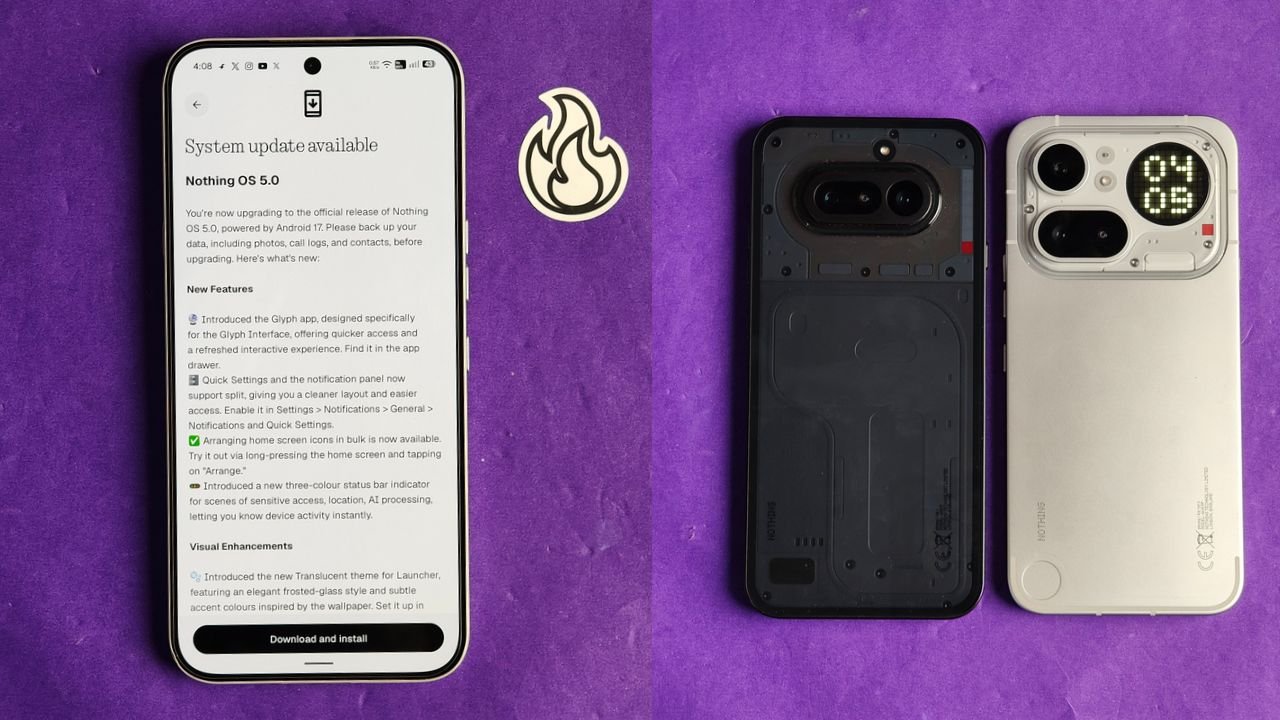
Nothing has started rolling out the stable Nothing OS 5.0 update for the Nothing Phone (4a) and Nothing Phone (4a) Pro. The new update is based on Android 17 and brings several new features, visual changes, camera improvements and other system enhancements.
The stable rollout has started ahead of Nothing’s previously announced early November schedule. However, the update is being released in stages, so it may take some time to reach all users.
Nothing OS 5.0 Update Size
The update is around 1.70 GB in size for beta users, and for non-beta users it is around 3 GB. Users can check for the latest update by going to Settings > System > System update.
What’s New in Nothing OS 5.0?
Nothing OS 5.0 brings quite a few changes to the overall user experience. Here are some of the important additions.
New Glyph App and Split Notifications
Nothing has introduced a dedicated Glyph app that makes it easier to access and manage Glyph Interface features.
The notification panel and Quick Settings can now be separated, giving users more control over how they access notifications and system shortcuts.
There is also a new three-colour status bar indicator that helps users identify sensitive activities such as location access and AI processing.
New Translucent Theme
One of the biggest visual changes is the new Translucent theme for the launcher.

It brings a frosted-glass look with subtle accent colours inspired by your wallpaper. You can enable it by going to Customisation > Theme & Style > Translucent.
Nothing has also added two new lock screen clock faces and the option to customise the clock colour.
New Widgets
The update introduces new widgets, including:
- Collector: Turns your photos into different decorative styles for your home screen.
- Away Time: Tracks how much time you spend away from your phone.
- Glyph Timer: Lets you access the Glyph Timer directly from the widget drawer.
Users can also arrange multiple home screen icons together instead of moving them one by one.
Camera Improvements
Nothing OS 5.0 brings several camera improvements to the Phone (4a) series.
The biggest addition is Dual-view Video, which allows users to record videos using the front and rear cameras simultaneously.
Nothing has also improved video recording, zoom, close-up photography, QR scanning, Google Lens and Motion Photo playback. The camera interface, controls and animations have also been refreshed.
Other Improvements
Apart from these changes, the update includes several smaller improvements:
- Expanded Dark Theme for more apps.
- Enhanced HDR brightness controls.
- Improved Depth wallpapers with pinch-to-resize support.
- Better Live Updates experience.
- Noto 3D Emoji support in Gboard.
- Faster Essential Voice transcriptions.
- Improved lock screen shortcuts.
- One-tap Bluetooth connection and disconnection.
- Refined system animations and a refreshed Settings interface.
How to Download Nothing OS 5.0
If you own a Nothing Phone (4a) or Phone (4a) Pro, follow these steps to check for the update:
- Open Settings on your phone.
- Go to System.
- Tap System update.
- Select Check for updates.
If the update is not available yet, don’t worry. Nothing is following a staged rollout, and it should reach more devices over the coming days.
Before installing, make sure to back up your important data and keep enough battery charge.
Stay updated with latest tech news
Follow TechiBoy on Google to get updates on smartphones, gadgets, software updates, and more.
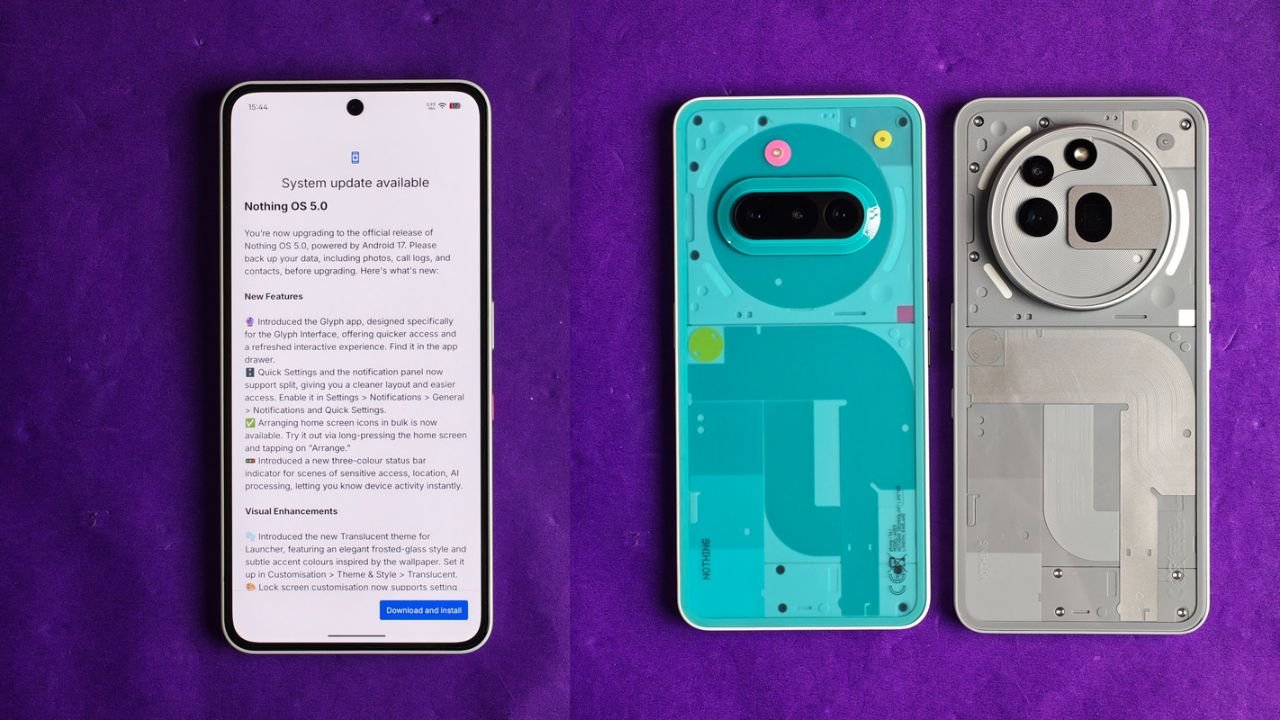
Nothing has started rolling out the Nothing OS 5.0 Stable Update based on Android 17 for the Nothing Phone (3a) and Nothing Phone (3a) Pro. The update brings several new features, UI changes, camera improvements and customisation options to both smartphones.
The new update is around 3.09GB in size and introduces a fresh Translucent Theme, redesigned Quick Settings, new widgets, lock screen customisation and more.
Nothing OS 5.0 Stable Update: What’s New?
One of the biggest changes is the new Translucent Theme. It brings a frosted-glass look to the home screen, with subtle colours that match the selected wallpaper. Users can enable it by going to Customisation > Theme & Style > Translucent.
Nothing has also introduced a new Glyph app, which provides quicker access to Glyph Interface settings. The Quick Settings and Notification Panel can now be separated, giving users a cleaner layout.
Here are some of the major changes included in the update:
1. New Features and UI Changes
- New Glyph App: A dedicated app for accessing Glyph Interface features.
- Separate Quick Settings: Users can now separate Quick Settings and Notifications.
- Bulk App Arrangement: Arrange multiple home screen icons together.
- New Status Bar Indicators: Three-colour indicators show sensitive access, location and AI processing activity.
- Translucent Theme: A new frosted-glass style for the launcher.
- New Clock Faces: Two new lock screen clock styles.
- Lock Screen Customisation: Users can now change the colour of the clock face.
- New Geist Typeface: Updated typography across the system.
2. New Widgets
Nothing OS 5.0 also brings some new widgets to the home screen.
- Collector Widget: Turn favourite photos into decorative home screen elements.
- Away Time Widget: Track how much time you spend away from your phone.
- Glyph Timer Widget: Start and access timers directly from the home screen.
3. Camera Improvements
The camera app has received several improvements with this update.
- Seven adjustable camera tuning effects with a reset option.
- Improved camera presets with easier editing.
- New 2×2 camera preset widget.
- Support for Filters and Tuning in video recording.
- Dual-view Video support.
- Improved zoom and close-up photography.
- Better QR scanning and Google Lens integration.
- Improved Motion Photo playback.
- Refreshed camera interface, controls and animations.
4. Other Improvements
Apart from the major features, Nothing has also added several useful improvements.
- Expanded Dark Theme support for more third-party apps.
- Enhanced HDR Brightness control.
- Depth Wallpapers now support pinch-to-shrink.
- Improved Live Updates experience.
- Noto 3D Emoji support in Gboard.
- Improved lock screen shortcuts.
- Bluetooth devices can now be connected or disconnected with a single tap from Quick Settings.
- Improved system animations and transitions.
Nothing OS 5.0 Update Size and Availability
The update size for this one is 3.09 GB, and the build number is Nothing OS C5.0-261023-2146.
The update is rolling out in phases, which means it may not be available to everyone at the same time. If you haven’t received it yet, you can check for it manually by going to Settings > System > System Update.
Nothing recommends backing up important data before installing the update.
Stay updated with latest tech news
Follow TechiBoy on Google to get updates on smartphones, gadgets, software updates, and more.
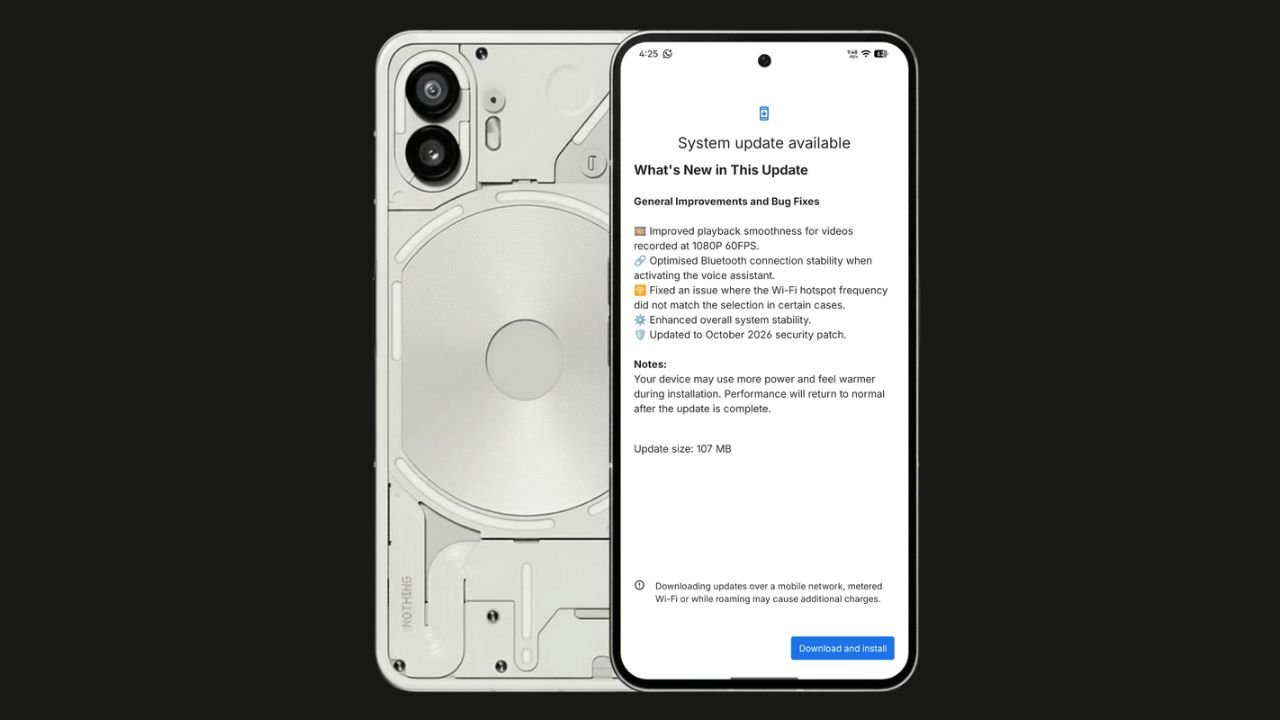
Nothing has started rolling out the Nothing OS 4.1 October 2026 update for the Nothing Phone (2). The update focuses on bug fixes, system stability improvements, and connectivity optimisations. It also brings the October 2026 security patch.
The update size is 107 MB, making it a relatively small maintenance update.
Nothing OS 4.1 October Update: What’s New?
According to the official changelog displayed on the device, the update includes the following improvements:
- Video playback: Improved smoothness for videos recorded at 1080p@ 60FPS.
- Bluetooth: Optimised connection stability when activating the voice assistant.
- Wi-Fi hotspot: Fixed an issue where the hotspot frequency did not match the selected option in certain cases.
- System stability: Enhanced overall system stability.
- Security: Updated to the October 2026 security patch.
How to Download the Update
Nothing Phone (2) users can check for the latest update by navigating to Settings > System > System Update. If the update is available, download and install it.
The rollout may happen in phases, so some users might have to wait before receiving the update.
If you don’t receive any OTA related to the update, you can manually update through our Nothing Firmware app.
Overall, the Nothing OS 4.1 October update is a minor maintenance release focused on improving the everyday user experience rather than introducing new features.
Stay updated with latest tech news
Follow TechiBoy on Google to get updates on smartphones, gadgets, software updates, and more.