Connect with us

WhatsApp

WhatsApp Testing View Once Text Messages on iPhone

Published

on

WhatsApp Text message view once

Stay updated with latest tech news

Follow TechiBoy on Google to get updates on smartphones, gadgets, software updates, and more.

WhatsApp is working on a new privacy feature that will allow users to send text messages that can only be viewed once. The feature is currently being tested on iOS and could be released to users in a future update.

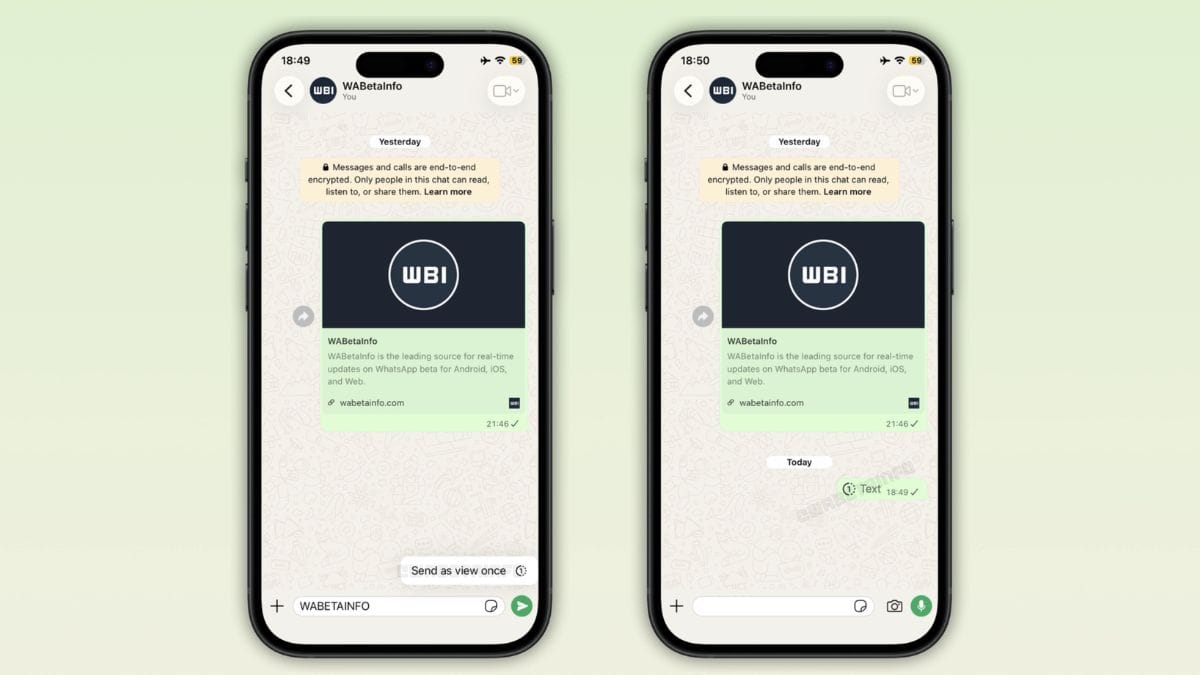
The new option is called “View Once” text messages. As the name suggests, the recipient will be able to read the message only one time. Once the message has been opened and viewed, it will automatically disappear from the chat.

To use the feature, users will reportedly need to long-press the Send button and select the “Send as View Once” option before sending the message.

WhatsApp already offers View Once support for photos, videos, and voice messages. With the addition of text messages, the company aims to extend this privacy-focused feature to more types of content.

According to reports, View Once text messages will work in both individual chats and group chats. However, the feature will not be available in WhatsApp Channels.

At the moment, the feature is not available in the public beta version of WhatsApp. It is currently being tested internally by WhatsApp developers, which means it may take some time before users can try it.

It is also worth noting that this feature is different from another WhatsApp feature spotted earlier this year. That feature allows messages to disappear after a specific time period, while View Once messages disappear immediately after being viewed for the first time.

WhatsApp has not officially announced a release date for the feature, but its appearance in testing suggests that it could arrive in a future update.

Source

Akash Ramsakha is the owner of TechiBoy.com, a website dedicated to technology reviews, software updates, and news. He also has an TechiBoy YouTube channel where he makes interesting content focused on Nothing Phone, OnePlus, and other tech products.

Click to comment

Leave a Reply

Your email address will not be published. Required fields are marked *

WhatsApp

WhatsApp Starts Testing Green Dot Online Indicator on iOS

Published

on

WhatsApp Green Dot Online Indicator

Stay updated with latest tech news

Follow TechiBoy on Google to get updates on smartphones, gadgets, software updates, and more.

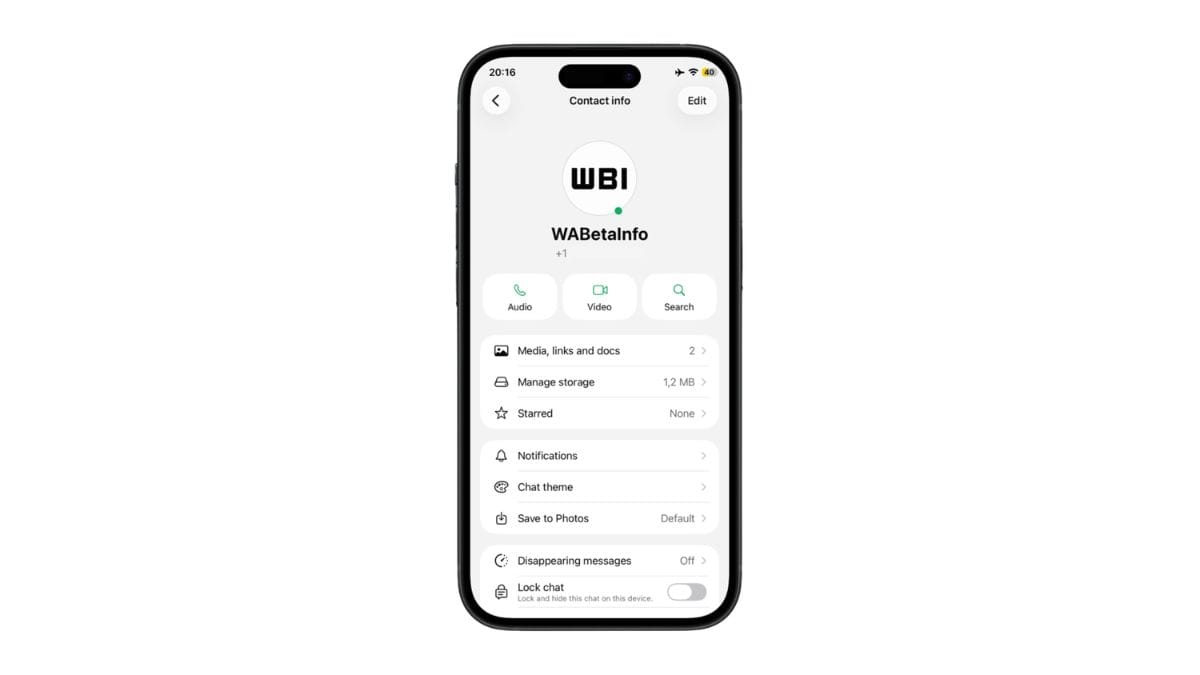
WhatsApp has started testing a new green dot feature on iOS that makes it easier to see when a contact is online.

The feature was first spotted on Android last month and is now being tested with some iPhone users. It is currently available in WhatsApp beta version 26.26.10.72 for iOS.

When a contact is online, a small green circle appears at the bottom-right corner of their profile photo on the Contact Info screen. The indicator works in real time and disappears as soon as the person goes offline.

For now, the green dot is only visible on the Contact Info screen, which can be opened by tapping a contact’s profile photo. The feature is not currently available in the main chat list or Chats tab.

WhatsApp is also applying its existing privacy settings to the new online indicator. This means that if a user has chosen to hide their last seen and online status, the green dot will not be visible to others.

The green dot online indicator is currently available to only some beta users on Android and iOS. There is no information yet on when WhatsApp will roll out the feature to all users.

Source

Continue Reading

News

WhatsApp Testing New Features for Audio and Video Calls

Published

on

WhatsApp Audio Video call New feature

Stay updated with latest tech news

Follow TechiBoy on Google to get updates on smartphones, gadgets, software updates, and more.

WhatsApp is working on new features to improve the calling experience for Android users. These updates were spotted in the latest beta version of the app (2.25.10.16) by WABetaInfo, a trusted source for WhatsApp news.

New Mute Button for Voice Calls

One of the new features is a mute button for incoming voice calls. This button appears in the notification panel, allowing users to mute their microphone while answering a call. While it’s still unclear how people will use this, it could be helpful in noisy places or when users want to answer quietly.

Turn Off Camera Before Answering Video Calls

Another helpful feature is for video calls. Users will be able to turn off their camera before picking up the call. This gives people a moment to get ready or stay off camera completely, especially when getting calls from unknown numbers. It adds a layer of privacy and comfort when using video chat.

Emoji Reactions in Video Calls

WhatsApp is also adding emoji reactions to video calls. This will let users react in real time using emojis, making group video calls more fun and interactive.

Rollout Details

These new features are currently available to a small group of beta testers using WhatsApp on Android. WhatsApp plans to roll them out to more users in the coming weeks.

Via

Continue Reading

WhatsApp

WhatsApp Rolled Out These New Features in August 2024

Published

on

WhatsApp August 2024

Stay updated with latest tech news

Follow TechiBoy on Google to get updates on smartphones, gadgets, software updates, and more.

The August month WhatsApp has introduced more exciting changes. These include a new voice chat mode for Meta AI and chat themes for individual chats along with new privacy-oriented features. There is a lot to explore so let’s dive into the list of new features added to WhatsApp in August.

As usual, some of these features are still in development and might be released later. So keep in mind that every feature will not be shown on your devices.

WhatsApp Features Added in August 2024

1. Community Group Descriptions (iOS)

One of the key features released this month is the description of the community group chat. This feature is available when creating a community group chat. Admins of the group can now enter detailed information about the group including rules and guidelines. This ensures that members have all the necessary information before or after joining a group.

WhatsApp Community Group Descriptions
Image via WABetaInfo.com

To access this feature make sure you have updated your WhatsApp to the latest version from the App Store. Although it is also coming to Android devices as shown in a screenshot it’s still in beta with no specific release date for Android users.

2. GIPHY Stickers Support

WhatsApp has partnered with GIPHY to bring their collection of stickers to the app making it easier for you to express yourself. This allows you to search for fun and hilarious stickers without leaving the chat. You can find these new stickers in the stickers section of the app.

3. Voice Chat Mode for Meta AI (Android and iOS)

WhatsApp is introducing a new voice chat mode designed to make interactions with Meta AI more convenient. Right now many users don’t communicate with the chatbot because they have to type out messages and wait for responses. With the new voice chat mode, you’ll be able to have real-time conversations with Meta AI by just using your voice.

WhatsApp Voice Chat Mode for Meta AI
Image via WABetaInfo.com

If you prefer typing you can switch back to the traditional method by tapping the keyboard option as seen in the screenshot. You can control how Meta AI responds by choosing between “Full” and “Brief” modes. The Full mode is ideal for detailed and lengthy responses while Brief mode is better for quick chats.

Image via WABetaInfo.com

WhatsApp will also offer 10 different voice models for the chatbot, allowing you to choose a voice that suits the nature of your conversation. You might select a calm voice for a serious discussion or a lively one for casual chat. Captions and transcripts for the voice chat will be available and can be turned off if desired.

4. Lists in WhatsApp Settings (Android)

WhatsApp is also adding a new “Lists” feature in its beta for Android. This follows the recent introduction of a favorites filter which helps you find your most frequently contacted people quickly. The new Lists feature will allow you to create custom lists of contacts and groups making it easier to find them in the app. It functions similarly to labels available to WhatsApp Business users.

Image via WABetaInfo.com

You can assign custom names and emojis to your lists making it easier to identify and organize them. For example, you could create a list for all your family members to quickly connect with them without missing anyone. This feature was recently spotted in WhatsApp Beta for Android and is expected to be available in the near future.

5. Hidden Visibility for Community Groups (Android and iOS)

For admins who manage community groups, WhatsApp is introducing a new feature that allows them to control the visibility of new group chats. Admins can now choose to hide new groups from other members of the community. But once a group is marked as hidden it will be permanently be hidden.

Hidden Visibility for WhatsApp Community Groups

This feature ensures that only invited members can see these hidden groups making it perfect for moderators, admins and secret groups within the community. The feature is available in the beta version of iOS and is expected to be released for all users later this year.

6. Duration for Community Group Chats (Android and iOS)

Following the recent introduction of the events feature, WhatsApp is now adding the ability to set a duration for community group events so that it is easier for group members to create and organize events in WhatsApp . Users will be able to set a start and end time for an event within the appw which will be visible to all members of the group.

Duration for Community Group Chats

This update will help organizers provide clear details about the duration of an event which will allow attendees to plan their schedules accordingly.

7. Avatars in Profile Photos (Android)

Currently, you can set either your own photo or your avatar as a profile picture but not both at the same time. But in an upcoming update, you can set both your photo and your avatar together. You will be able to swipe on your profile photo to view your avatar.

This feature is great for those who want to use an avatar without removing their current photo. It’s currently in beta and is expected to be available in a future release.

8. New Default WhatsApp Theme (Android)

WhatsApp is planning to update its default theme as part of its ongoing efforts to introduce new color options. The app will replace its traditional green theme with a new black and white theme.

New Default WhatsApp Theme
Image via WABetaInfo.com

WhatsApp will feature black accents in light mode and white accents in dark mode for better visibility. Users will also have the option to change the default theme of the app to a color of their choice.

9. New Individual Chat Themes (Android and iOS)

WhatsApp is bringing a feature that will allow users to apply different themes to individual chats. This means you can personalize each chat with its own unique theme similar to how you can customize themes on Instagram or Facebook Messenger. However, the theme you apply will only be visible to you and not to the other person in the chat.

Image via WABetaInfo.com

You might be able to change the color of the message bubbles for even more customizations to your chat. The feature will launch with 10 themes and could offer more options in the future.

10. Status Updates Reaction (Android)

To make status updates more engaging WhatsApp is introducing a new heart reaction feature. This will allow users to quickly react to status updates with a heart icon similar to reactions on Instagram stories. So that you can quickly react with a heart showing the person that you liked their status.

WhatsApp Status Updates Reaction
Image via WABetaInfo.com

When you react with a heart the recipient will be notified and can see who reacted to their status from the views list. If you don’t want others to react on your story, you will get an option to disable reaction notifications in the settings. The exact release date for this feature is not yet clear.

11. Block Bulk Messages From Unknown Numbers (Android)

Dealing with spam messages from some scammers or businesses can be frustrating. To address this issue, WhatsApp is introducing a new feature called “Block unknown account messages.” This feature will allow you to prevent messages from unknown numbers from reaching you.

Block Bulk Messages From Unknown Numbers
Image via WABetaInfo.com

WhatsApp will automatically block incoming messages from unknown numbers once they exceed a certain threshold. This will help reduce spam and save you from dealing with unwanted messages. The feature is currently in testing and will be available in the Advanced option within Privacy settings.

12. PIN Verification (Android)

To further limit unwanted contact from businesses and unknown numbers WhatsApp is adding a PIN verification method. This feature is also in beta testing and will let users set up a PIN with at least four digits. Once the PIN is set up any unknown number trying to contact you for the first time will need to enter the PIN to send messages.

Image via WABetaInfo.com

If you don’t share the code with them there’s no way they will be able to message you on the app even if they have your number. However this will not affect existing chats with your contacts and businesses.

13. AR Effects and Filters for Video Calls (iOS)

For iOS users who enjoy video calling WhatsApp is adding exciting new features including AR effects, face filters, and backgrounds. These features will be available during video calls allowing you to experiment with fun face effects similar to those on Snapchat. There’s also a “Touch Up” feature that will smooth out your face for those times when you need to join a call quickly without having time to get ready.

AR Effects and Filters for Video Calls
Image via WABetaInfo.com

You can blur your background or choose different scenarios to enhance your video calling experience. These updates are designed to make video calls more enjoyable and engaging for users.

14. Mark All Chats as Read (Android)

WhatsApp is introducing a long-requested feature for Android users that is the ability to “Mark all as Read”. This new option which was recently spotted in the beta version allows you to mark all unread messages as seen with a single tap.

Mark All Chats as Read
Image via WABetaInfo.com

This feature will help you to clear the clutter of unread messages from your chats which often include messages from businesses. It will save your time and hassle of opening each individual chat to mark messages as read. Although there is no specific timeline for its release but it is expected to be available soon.

15. Passkey Protected Backups (Android)

WhatsApp is enhancing the security of its backups with a new feature called Passkey integration. Currently, WhatsApp backups are protected by end-to-end encryption using a 64-bit encryption key that can only be accessed via a secure backup. This ensures that only you can access your chats and media files. The new Passkey feature will allow you to unlock your secure backups using biometric authentication such as your fingerprint or face recognition.

Passkey Protected Backups
Image via WABetaInfo.com

This will make it easier to access your backups without needing to remember a complex password. Instead, you can use your biometric data to quickly and securely remove the encryption.

Source | Via

Continue Reading